Who pays NeroPay’s processing fee decides two things: what your merchants are charged, and how that charge appears on their statements. This page explains the two pricing models that result, and what each one means for your margin.
💡 Note: this page is about the fee payer setting in NeroConnect Settings → Pricing — who is charged for what. That setting is separate from the partnership model described in the white label guide, even though both use the words “platform” and “connected”.
The two pricing models
Your choice of fee payer produces one of the two standard pricing models used across the payments industry — bundled or itemised. The end customer pays once at checkout either way; what changes is who is charged behind it and what your merchant sees.
Platform account pays — bundled pricing
Your merchants are charged a single all-in rate, set by you. NeroPay’s processing cost is settled against your platform balance behind the scenes, and whatever is left is your margin. Your merchants never see NeroPay’s cost, and NeroPay does not appear as a separate charge to them.
| Step | What happens |
|---|---|
| Merchant is charged | Your platform rate, as set in Default merchant pricing |
| NeroPay collects | Your agreed processing cost, taken from your platform balance |
| Your margin | The difference between the two |
| Merchant statement shows | One combined rate |
💡 Note: in this model connected accounts see a £0.00 NeroPay charge, because the cost has already been settled against your platform balance.
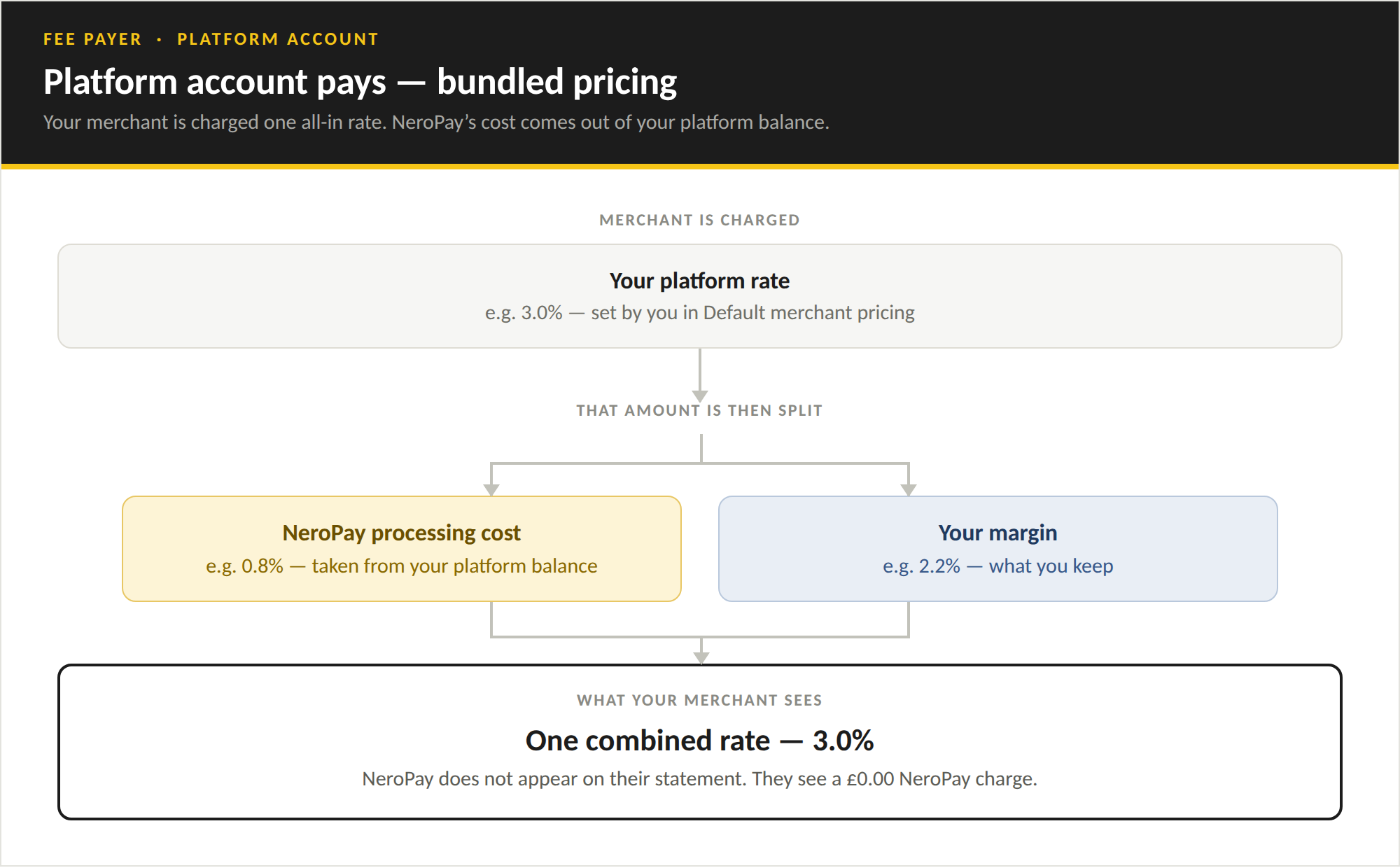
⚠️ Example figures only. The percentages in this diagram are illustrative. Actual rates depend on the pricing configured in NeroConnect and your agreed NeroPay pricing for each payment type. Fixed fees may also apply.
Connected account pays — itemised pricing
NeroPay’s processing fee and your platform fee are calculated separately and both charged to the merchant. The end customer still makes one payment at checkout; the split happens after it settles. Your income is the platform application fee rather than a retained margin.
| Step | What happens |
|---|---|
| Merchant is charged | NeroPay’s processing rate, plus your platform application fee |
| NeroPay collects | Its processing fee directly from the connected account |
| You collect | Your application fee directly from the connected account |
| Merchant statement shows | Two separate line items |
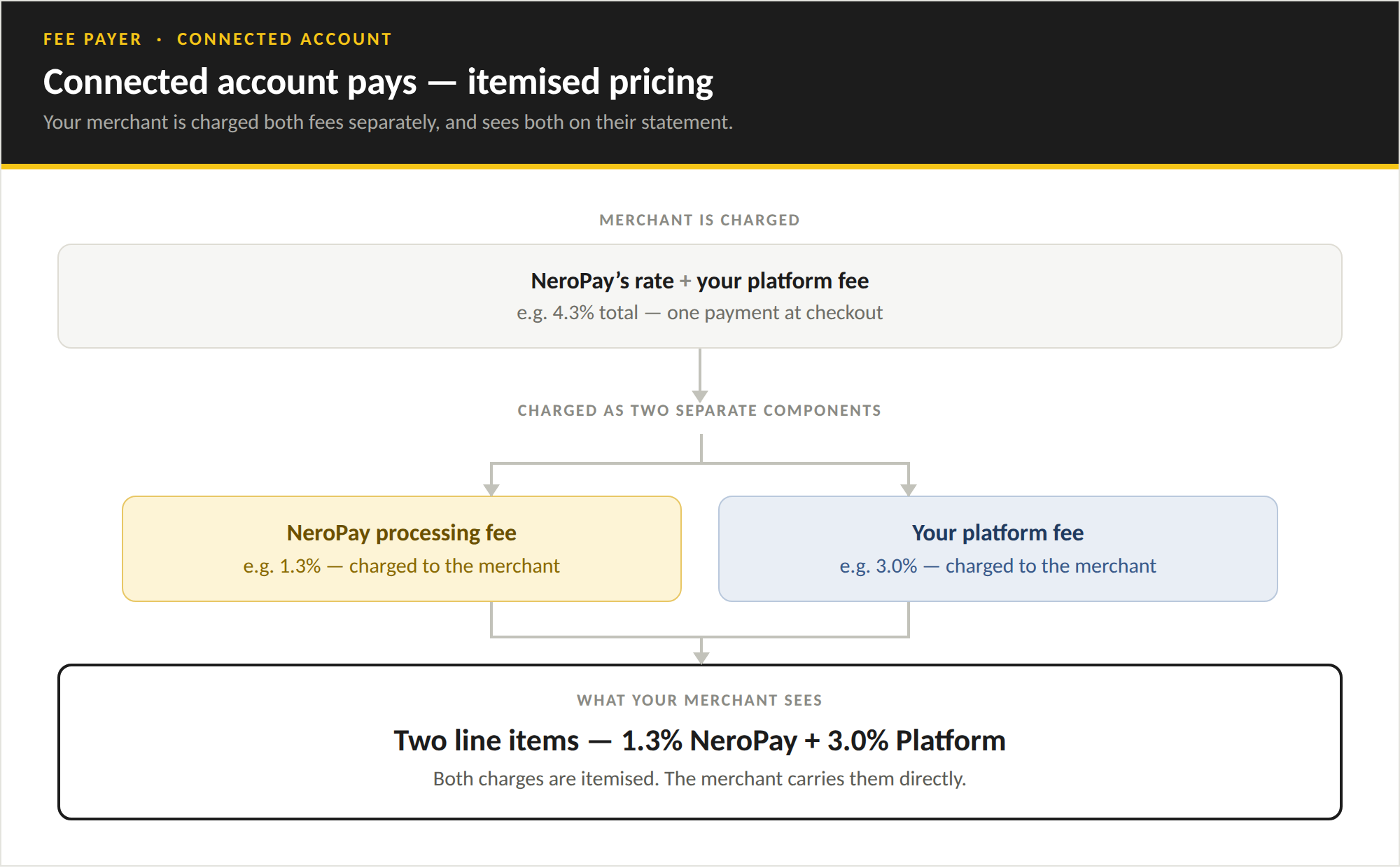
⚠️ Example figures only. The percentages in this diagram are illustrative. Actual rates depend on the pricing configured in NeroConnect and your agreed NeroPay pricing for each payment type. Fixed fees may also apply.
The two models side by side
| Platform account pays | Connected account pays | |
|---|---|---|
| Pricing model | Bundled | Itemised |
| Merchant statement | One combined rate | Two separate line items |
| NeroPay fee settled against | Your platform balance | The connected account |
| Your income | Margin retained from the rate you set | Application fee charged on top |
| Merchant sees NeroPay’s fee | No | Yes |
| Platform protection applies | Yes | No |
Monthly active account and terminal fees
Active account and terminal fees are recurring monthly charges, billed separately from transaction processing. They have their own payer setting, which is independent of the processing fee payer — you can charge one to your merchants and pay the other yourself.
| Setting | What happens |
|---|---|
| Platform account | Monthly active account and terminal fees are charged to your platform balance |
| Connected account | Monthly active account and terminal fees are billed directly to each connected account |
⚠️ Balance recovery: where fees are billed to the connected account and that account does not hold enough GBP balance to cover them, the uncollected amount may default to the platform for recovery so that service is not interrupted. Setting your connected accounts as the payer does not remove your platform from the chain.
Where to change these settings
Go to NeroConnect → Connected Accounts → NeroConnect Settings and open the Pricing tab. Both fee payer settings sit at the top, and the default rate fields below them change depending on which options you select.
See NeroConnect Overview for the full list of controls on that tab, including default rates for new connected accounts and transaction history fee visibility.
Frequently asked questions
Q: Will my merchants see NeroPay’s fee on their statement? A: Only when NeroPay processing fees are paid by the connected account. In that model the fee is itemised, so the statement shows NeroPay’s processing fee and your platform fee as two separate line items. When the platform account pays, merchants see a single combined rate and a £0.00 NeroPay charge.
Q: Can I charge processing fees to my merchants but pay the monthly account and terminal fees myself? A: Yes. The two payer settings are independent. Set NeroPay processing fees are paid by to Connected account and Monthly active account and terminal fees are paid by to Platform account.
Q: What happens if a connected account cannot cover its monthly account or terminal fee? A: The uncollected amount may default to the platform for recovery so that service is not interrupted.
Q: Does changing a default rate affect merchants who have already been onboarded? A: No. Default rates apply to newly created connected accounts only. Existing accounts keep the rates they were set up with.
Q: Why does a report total differ from the amount shown on the terminal? A: Reports can show either gross sales or sales net of processing fees. A per-transaction total added up by hand is gross; a figure shown after fees have been applied is net. Check which basis a report is using before reconciling the two.
Still need help? Contact us at support@neropay.app or create a ticket