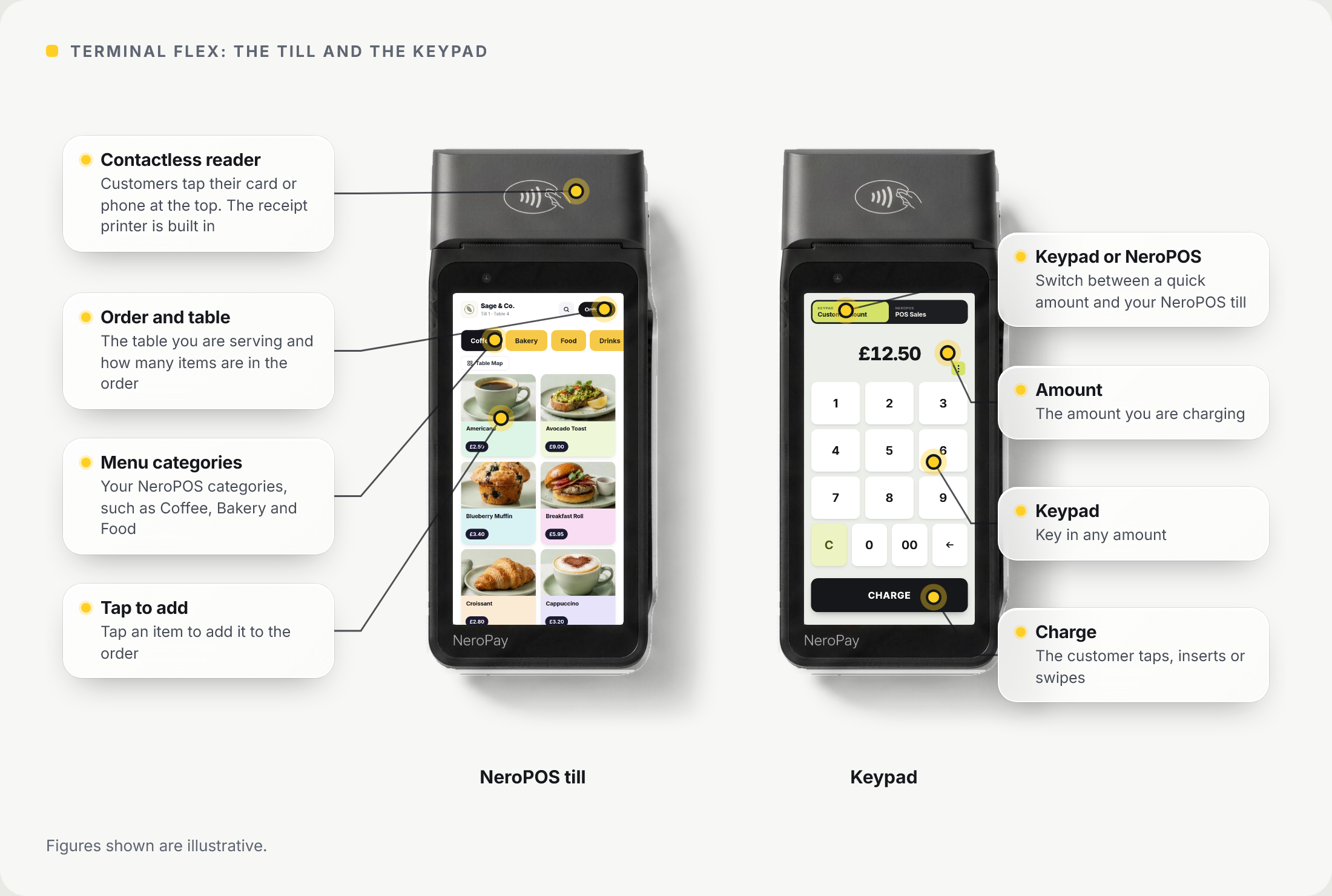
Terminal Flex is a slim handheld card terminal with a built-in receipt printer. It works over wi-fi or 4G, runs your NeroPOS till, and takes orders and payments at the table.
📸 Terminal Flex: the NeroPOS till and the keypad. Figures shown are illustrative.
What it does
| Feature | What it means for you |
|---|---|
| Built-in printer | Prints the customer receipt straight from the terminal |
| Wi-fi and 4G | Take payments anywhere in your venue, or away from it on 4G |
| 5.5-inch screen | A full-height display for orders, tips and payments |
| NeroPOS till | Your menu on the Flex: tap items to build the order, then take the payment |
| Keypad | Key in any amount for a quick sale |
| NeroPOS card reader | Or link the Flex to a NeroPOS till so card payments from the till go to the Flex |
| Orders at the table | Take the order and the payment where the customer is sitting |
| Tips | Ask for a tip before payment. See Enabling tips on the terminal |
| One flat rate | Visa, Mastercard and American Express, debit or credit, all at the same rate |
| Languages | Run it in 8 languages and print receipts in two. See Terminal language and receipts in two languages |
| Xero and QuickBooks | Your transactions sync to Xero and QuickBooks instantly |
Taking a payment
📸 Taking a payment on Terminal Flex. Figures shown are illustrative.
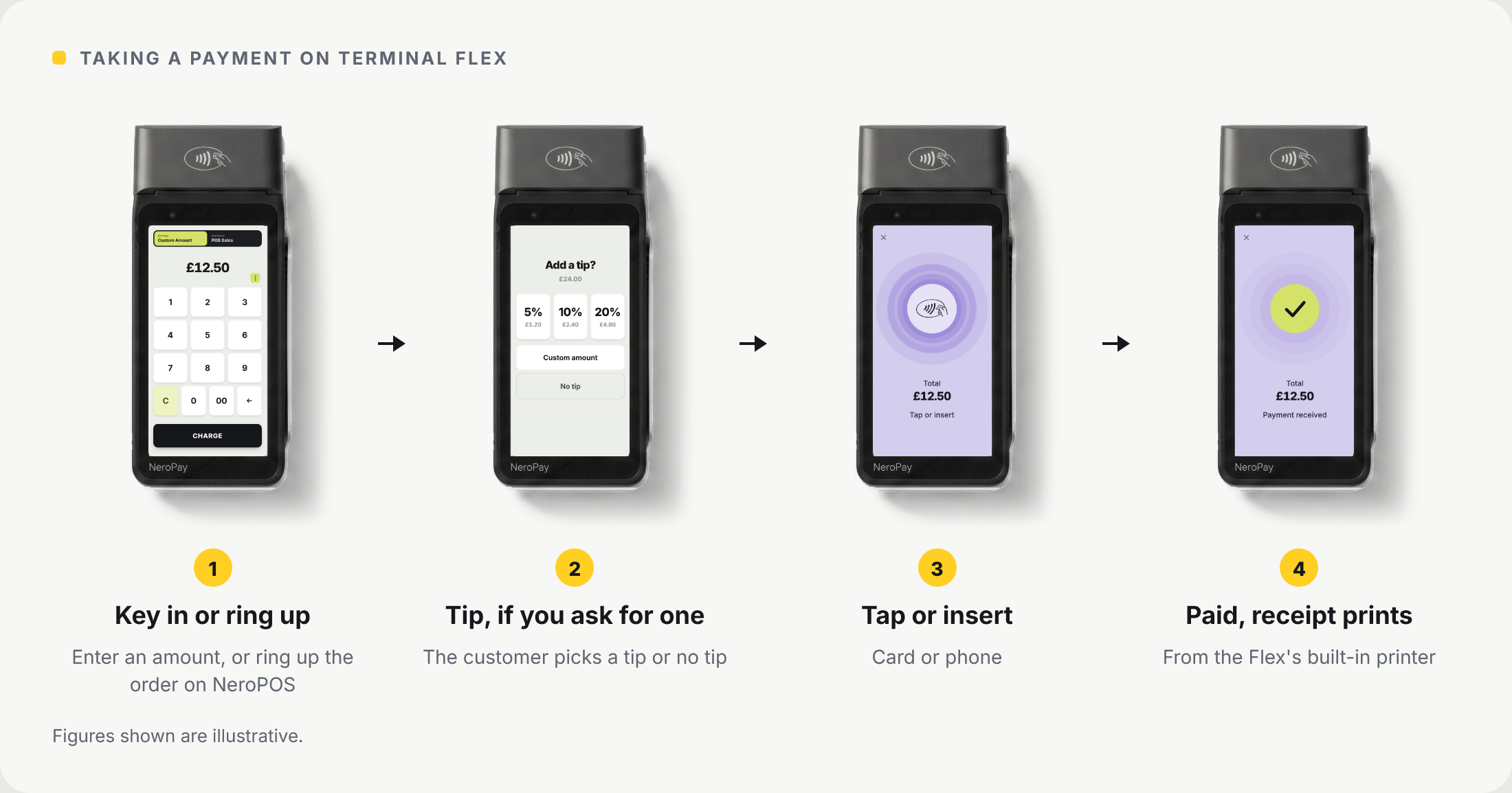
| Step | What happens |
|---|---|
| 1 | Key in an amount and tap Charge, or ring up the order on the NeroPOS till |
| 2 | If tips are on, the customer picks a tip or No tip |
| 3 | The customer taps or inserts their card, or taps their phone |
| 4 | The payment is received and the receipt prints from the Flex |
Try it yourself
Take a payment on Terminal Flex: key in an amount, press CHARGE, then drag a card onto the terminal. Nothing here is a real payment.
At the table
📸 Ordering and paying at the table with Terminal Flex.

Getting started
Setting up a Flex follows the same steps as our other terminals: power on, connect to wi-fi or 4G, and sign in to your NeroPay account. See Terminal onboarding and Activating cellular data on the terminal.
Working with your other NeroPay devices
The Flex works alongside Terminal Max and Terminal Pro+ on the same NeroPOS account. Prep tickets and bills can print on the Flex or on the printers you choose in POS Settings - Printing. To compare the three, see Choosing a NeroPay terminal.
Frequently asked questions
Does the Flex need wi-fi?
No. It works over wi-fi or 4G.
Can the Flex print receipts?
Yes. It has a built-in receipt printer.
Can I use the Flex with NeroPOS?
Yes. Your NeroPOS till runs on the Flex, so you can ring up an order and take the payment on the same device.
Can I take tips on the Flex?
Yes. See Enabling tips on the terminal.
Can I use the Flex with a Terminal Max?
Yes. Both work on the same NeroPOS account at the same time.
How are my card payments kept secure?
See the NeroPay Trust Centre for how NeroPay protects card payments, your account and your data.
Still need help? Contact us at support@neropay.app or create a ticket.