How to get there
From your dashboard, follow this path:
NeroTrade → Dashboard
💡 Not activated yet? Go to eu.neropay.app/merchant/nerotrade to activate NeroTrade. The full system is £99.95/month.
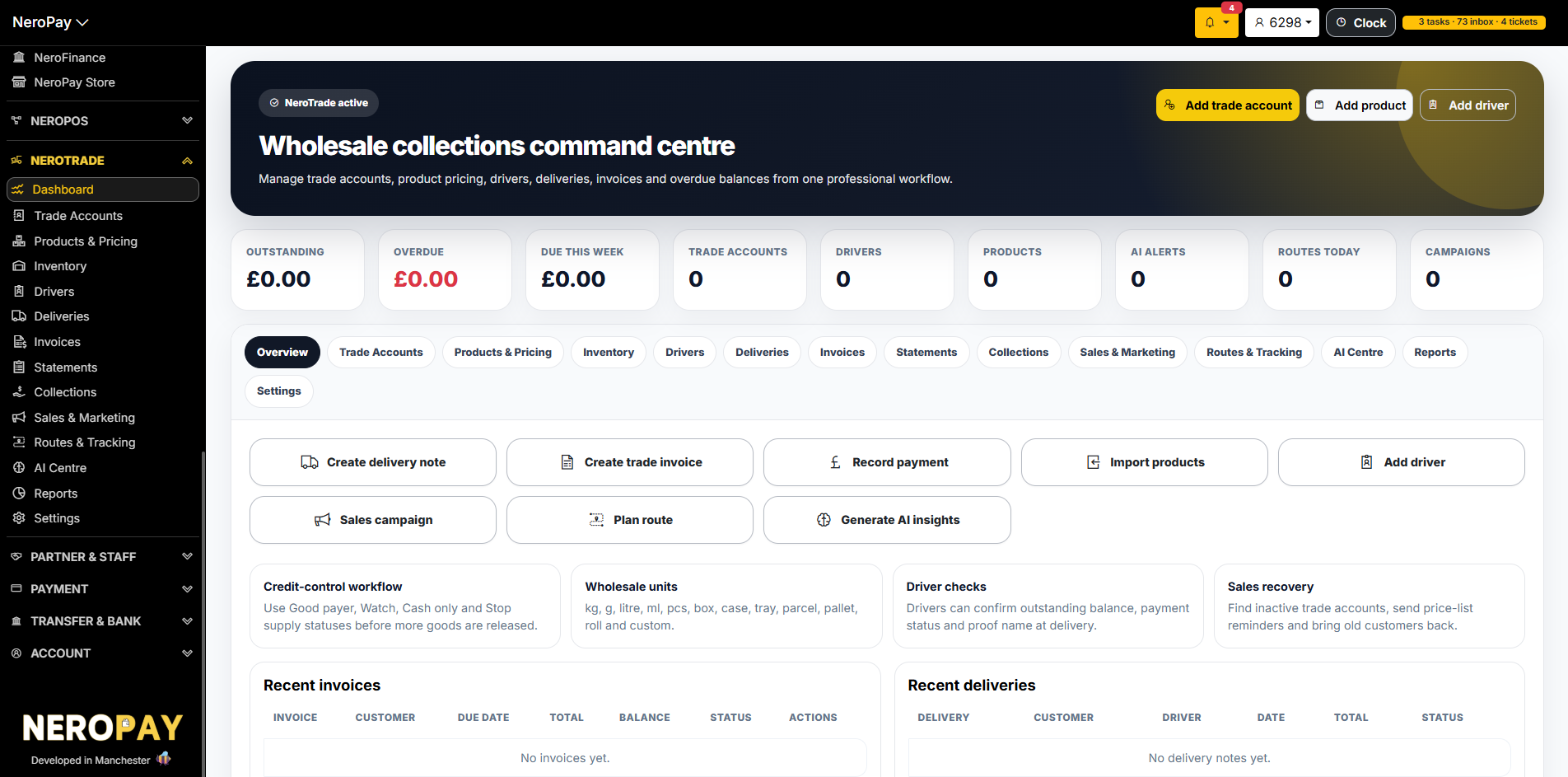
Dashboard — Wholesale collections command centre
The NeroTrade Dashboard gives you a live overview of your entire trade operation:
| Metric | What it shows |
|---|---|
| Outstanding | Total amount owed across all trade accounts |
| Overdue | Amount past due date — shown in red |
| Due this week | Payments expected in the next 7 days |
| Trade accounts | Total number of B2B customer accounts |
| Drivers | Active drivers in your system |
| Products | Total trade products in your catalogue |
| AI alerts | Active risk or stock alerts from NeroAI |
| Routes today | Delivery routes scheduled for today |
| Campaigns | Active sales or marketing campaigns |
Quick actions from the dashboard:
- Create delivery note
- Create trade invoice
- Record payment
- Import products
- Add driver
- Sales campaign
- Plan route
- Generate AI insights
📸
What's in NeroTrade
NeroTrade has the following sections, accessible from the left menu or the tabs across the top of the dashboard:
| Section | What it covers |
|---|---|
| Trade Accounts | Create and manage B2B customer accounts with credit terms, limits, and collection methods |
| Products & Pricing | Add wholesale products with units, pricing, and VAT settings |
| Inventory | Track stock quantities, reorder levels, barcodes, and supplier references |
| Drivers | Add drivers, assign routes, and manage proof-of-delivery workflows |
| Deliveries | Create delivery notes, capture proof, and link to invoices |
| Invoices | Create invoices from delivery notes, send to customers, and track payment status |
| Statements | Send weekly or monthly statements showing balance, invoices, and overdue amounts |
| Collections | Monitor outstanding balances, payment promises, failed collections, and credit risk |
| Sales & Marketing | Run sales campaigns, identify inactive accounts, and send price list reminders |
| Routes & Tracking | Plan driver routes, assign stops, and track deliveries |
| AI Centre | Use NeroAI for product imports, stock insights, customer risk analysis, and collection priorities |
| Reports | Export invoices, statements, collections, and financial summaries |
| Settings | Configure account-level NeroTrade preferences |
Adding a trade account
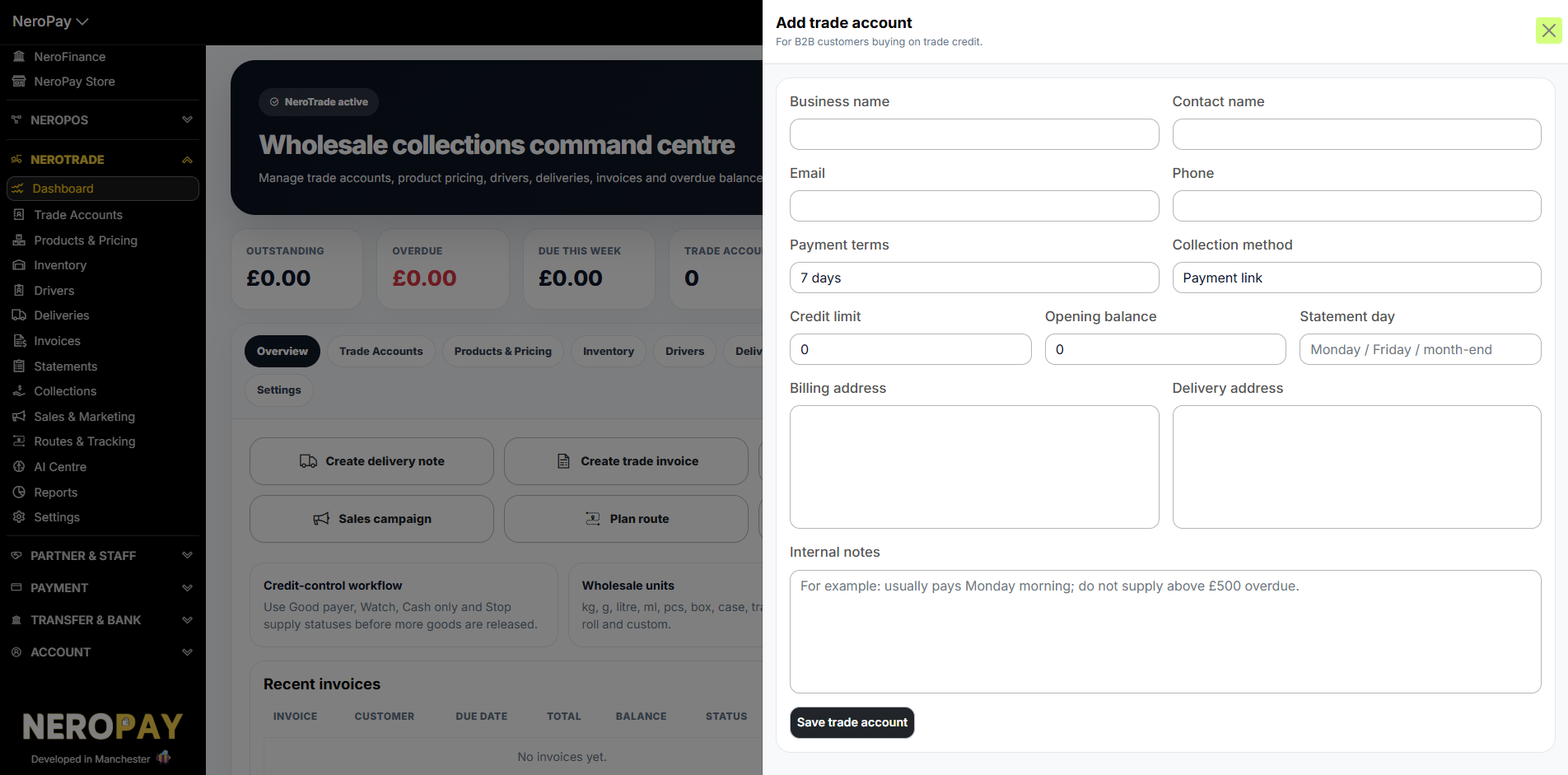
Click Add trade account from the dashboard and fill in:
| Field | What to enter |
|---|---|
| Business name | The B2B customer's company name |
| Contact name | Main contact at the business |
| Contact email address | |
| Phone | Contact phone number |
| Payment terms | e.g. 7 days, 14 days, monthly |
| Collection method | e.g. Payment link, bank transfer |
| Credit limit | Maximum credit allowed for this account |
| Opening balance | Any existing balance to carry over |
| Statement day | Monday, Friday, or month-end |
| Billing address | Invoice address |
| Delivery address | Where goods are delivered |
| Internal notes | Staff-only notes — e.g. "usually pays Monday morning; do not supply above £500 overdue" |
Click Save trade account to create the account.
📸
Adding a trade product
Trade products are separate from NeroPOS products — designed for wholesale units and trade pricing.
Click Add product and fill in:
| Field | What to enter |
|---|---|
| Product name | e.g. Chicken Doner 10kg |
| SKU | Stock keeping unit reference |
| Barcode | Auto-generated if left blank |
| Category | e.g. Meat / Tools / Drinks |
| Base unit | e.g. Kilogram (kg), Litre, Box, Pallet |
| Unit price | Price per base unit |
| VAT rate % | VAT percentage — 0 if not applicable |
| Pack unit | Optional — for case or pack selling |
| Pack quantity | Number of units per pack |
| Stock quantity | Current stock level |
| Reorder level | Threshold for low-stock alert |
| Preferred supplier | Optional internal reference |
| Track stock | Toggle on to monitor inventory |
| VAT included | Toggle if price already includes VAT |
| AI stock watch | Let NeroAI flag low stock automatically |
| Description | Optional product description |
Click Save product to add it to your catalogue.
📸
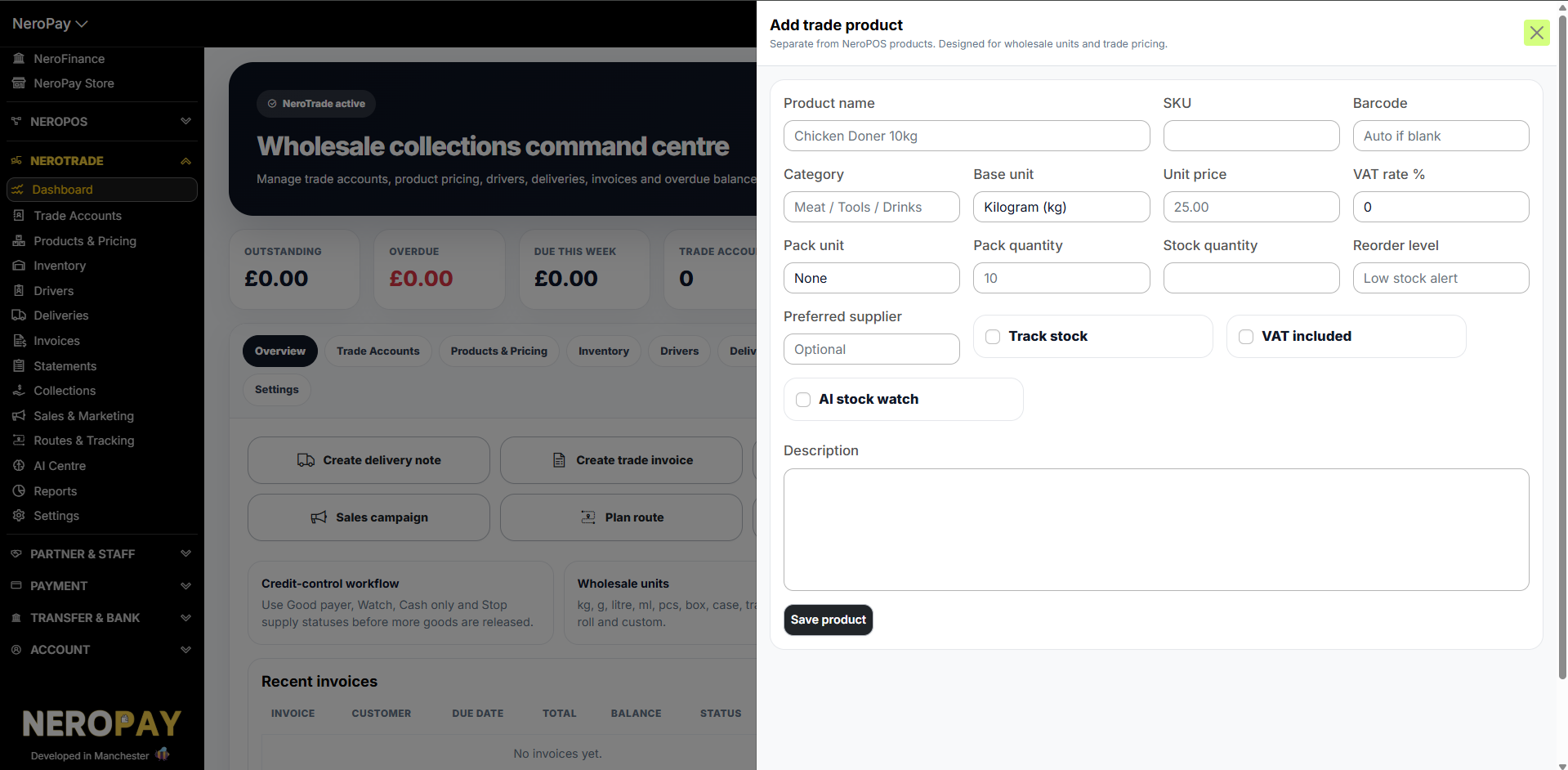
Supported wholesale units: kg, g, litre, ml, pcs, box, case, tray, parcel, pallet, roll and custom.
Adding a driver
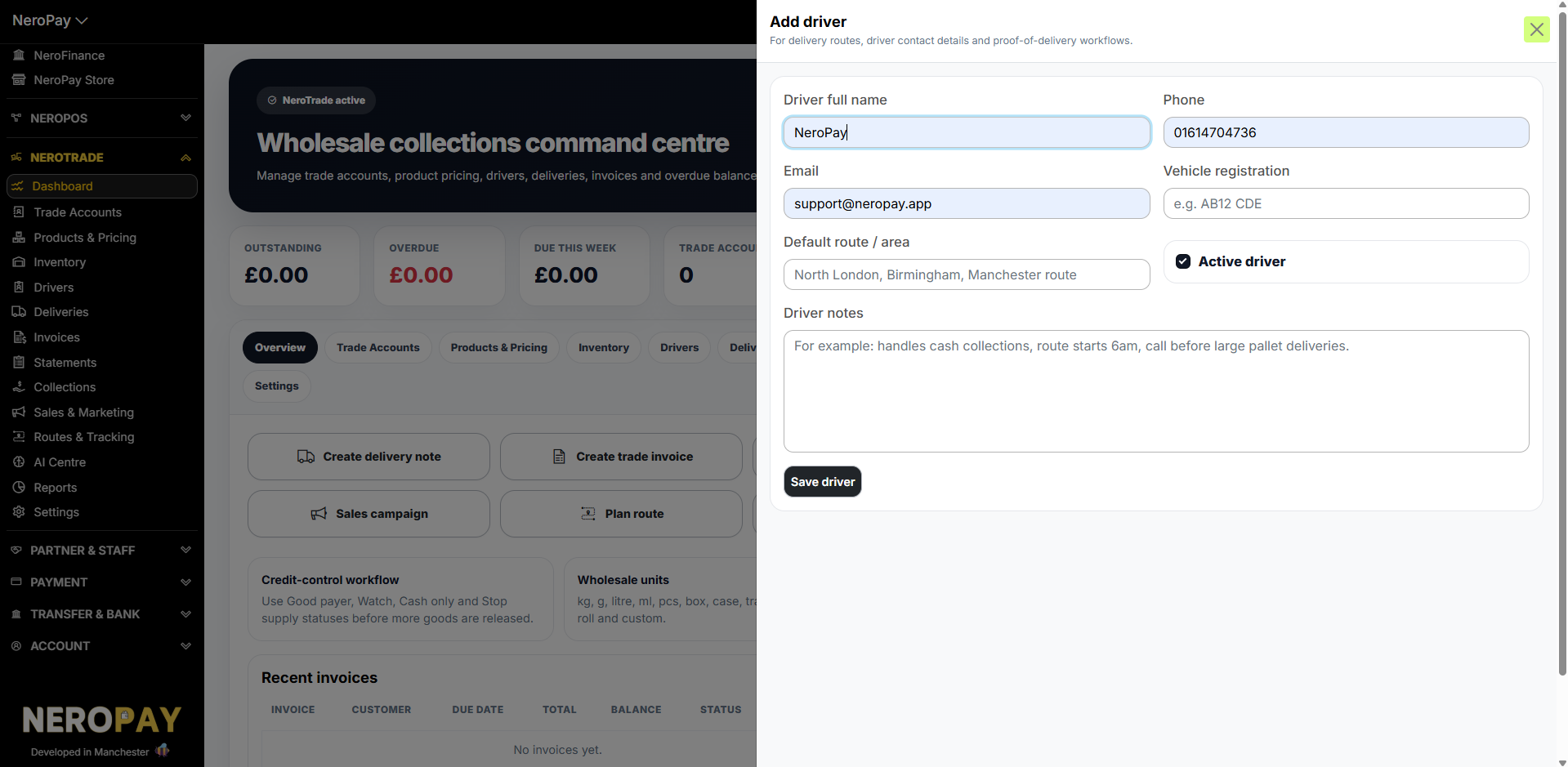
Click Add driver and fill in:
| Field | What to enter |
|---|---|
| Driver full name | Driver's name |
| Phone | Contact number |
| Driver email address | |
| Vehicle registration | e.g. AB12 CDE |
| Default route / area | e.g. North London, Birmingham, Manchester route |
| Driver notes | e.g. handles cash collections, route starts 6am |
| Active driver | Tick to make the driver available for route assignment |
Click Save driver.
📸
Credit control workflow
NeroTrade gives your team practical credit-control states that are easy to understand at the point of delivery:
- Good payer
- One week behind
- Two weeks behind
- Over credit limit
- Cash only
- Stop supply recommended
Use these statuses before more goods are released to flag accounts needing action.
Who is NeroTrade for?
NeroTrade is designed for any business selling on trade credit, including cash & carry, meat and doner factories, food suppliers, plumbers merchants, tools suppliers, packaging suppliers, building suppliers and other B2B distributors.
Frequently asked questions
Q: Is NeroTrade separate from NeroPOS? A: Yes. NeroTrade is designed to be separate from NeroPOS so trade customers, wholesale prices, delivery notes and statements do not mix with consumer-facing POS customers and campaigns.
Q: What wholesale units does NeroTrade support? A: NeroTrade supports multiple wholesale units including kg, g, litre, ml, pcs, box, case, bag, tray, parcel, pallet, roll, metre and custom units.
Q: Can customers pay online? A: NeroTrade supports invoice payment links and collection workflows through NeroPay. Card, bank transfer and Direct Debit availability may depend on your account setup and enabled payment methods.
Q: Does NeroTrade include AI? A: Yes. NeroAI features can help with product imports, price list extraction, low-stock insights, customer risk insights and collection priority suggestions.
Q: How much does NeroTrade cost? A: NeroTrade is £99.95 per month for the full trade collection system. Payment processing fees may apply separately.
Still need help? Contact us at support@neropay.app or create a ticket