The NeroPay Partner Programme is for people and businesses who already know business owners. You introduce a business that takes card payments, and NeroPay contacts it, sets it up and supports it. For each business that goes live you receive a one-off bonus, and in any month you introduce three or more, a share of what those businesses' card payments earn NeroPay.
How an introduction works
📸 From your introduction to the bonus for that business.
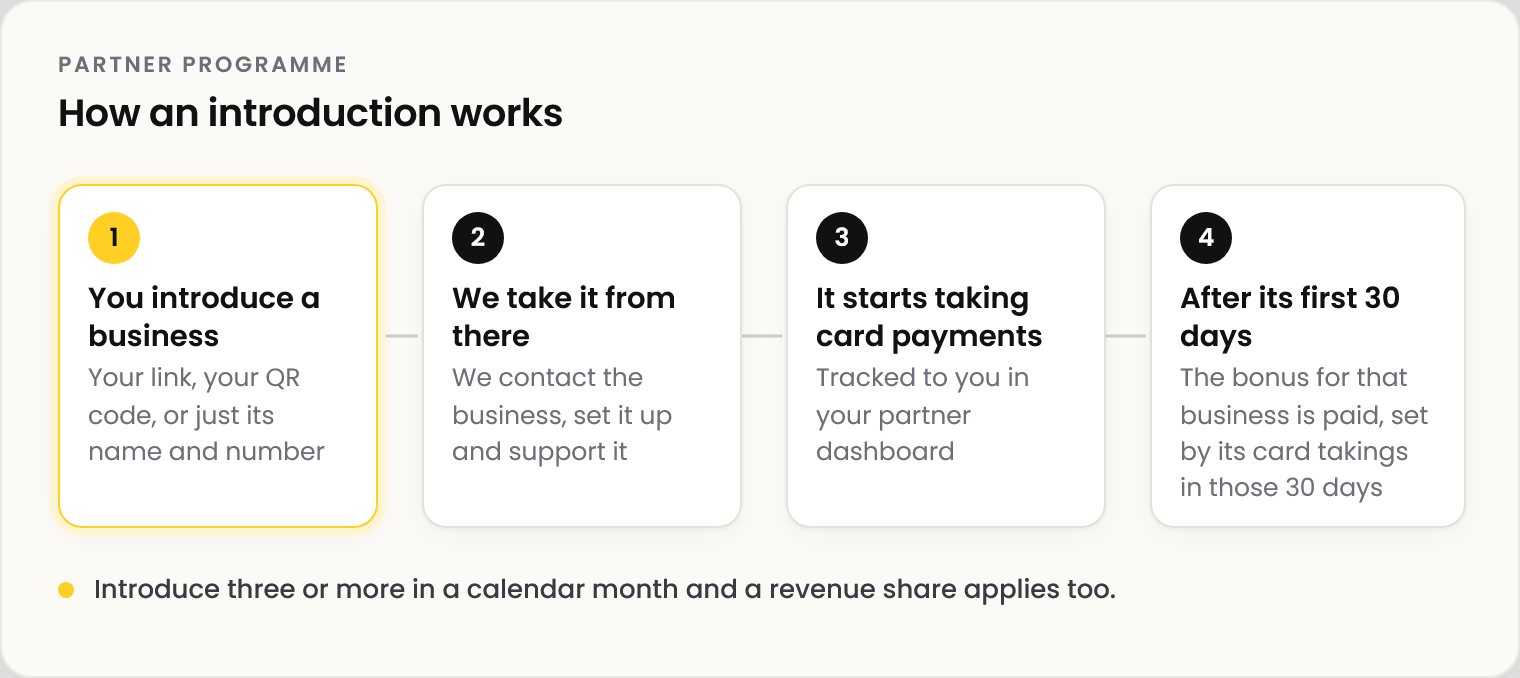
| Who | What they do |
|---|---|
| You | Introduce a business you know. Your link, your QR code, or its name and a contact number is enough |
| NeroPay | Contacts the business, onboards it, sets it up and supports it from then on |
| The business | Takes card payments with NeroPay |
💡 Note: You don't need to sell anything or set anything up. Send the business's name and a contact number to partners@neropay.app and the NeroPay team makes the call.
Who it's for
Anyone who knows business owners and can make an introduction. No technical knowledge is needed. Partners are usually:
- EPOS providers and IT installers
- Wholesalers, distributors and cash and carry teams
- Accountants and bookkeepers
- Restaurant, café and shop owners
- People active in a local business community
Getting started
| Step | What happens |
|---|---|
| 1 | Go to neropay.app/partners |
| 2 | Enter your details and agree to the programme terms. You can register as a person or as a company |
| 3 | Your referral link and QR code are ready straight away, in Partner & Staff → Partner Programme |
| 4 | Share either with a business you know. When it signs up through them, it is tracked to you automatically |
The bonus — one per business
For each business you introduce, you receive a one-off bonus once it has been taking card payments with NeroPay for 30 days. The amount is set by the business's total card takings in those first 30 days.
📸 The three bonus amounts and the first-30-day card takings that set each one.
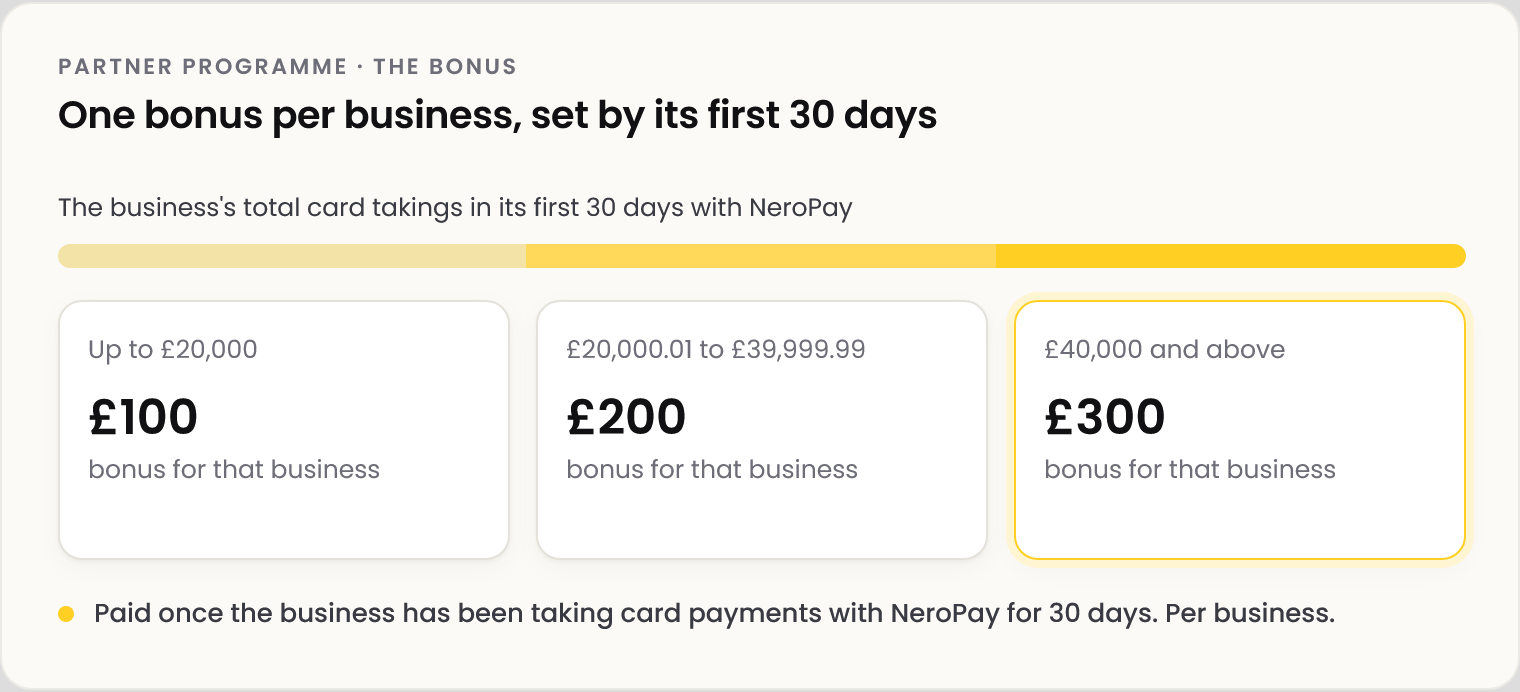
| The business's card takings in its first 30 days | Bonus for that business |
|---|---|
| Up to £20,000 | £100 |
| £20,000.01 to £39,999.99 | £200 |
| £40,000 and above | £300 |
💡 Note: The bonus is per business, with no minimum number. The 30 days start when the business registers, and every bonus is paid whether or not you introduce three in a month.
The revenue share — in months you introduce three or more
In any calendar month where you introduce three or more new active businesses, you are an Active Partner for that month and receive a share of what your businesses' card payments earn NeroPay. It covers every business you have introduced, not only that month's new ones. The rate is set by how many you introduce that month.
📸 The monthly revenue share, by new active businesses introduced in the calendar month.
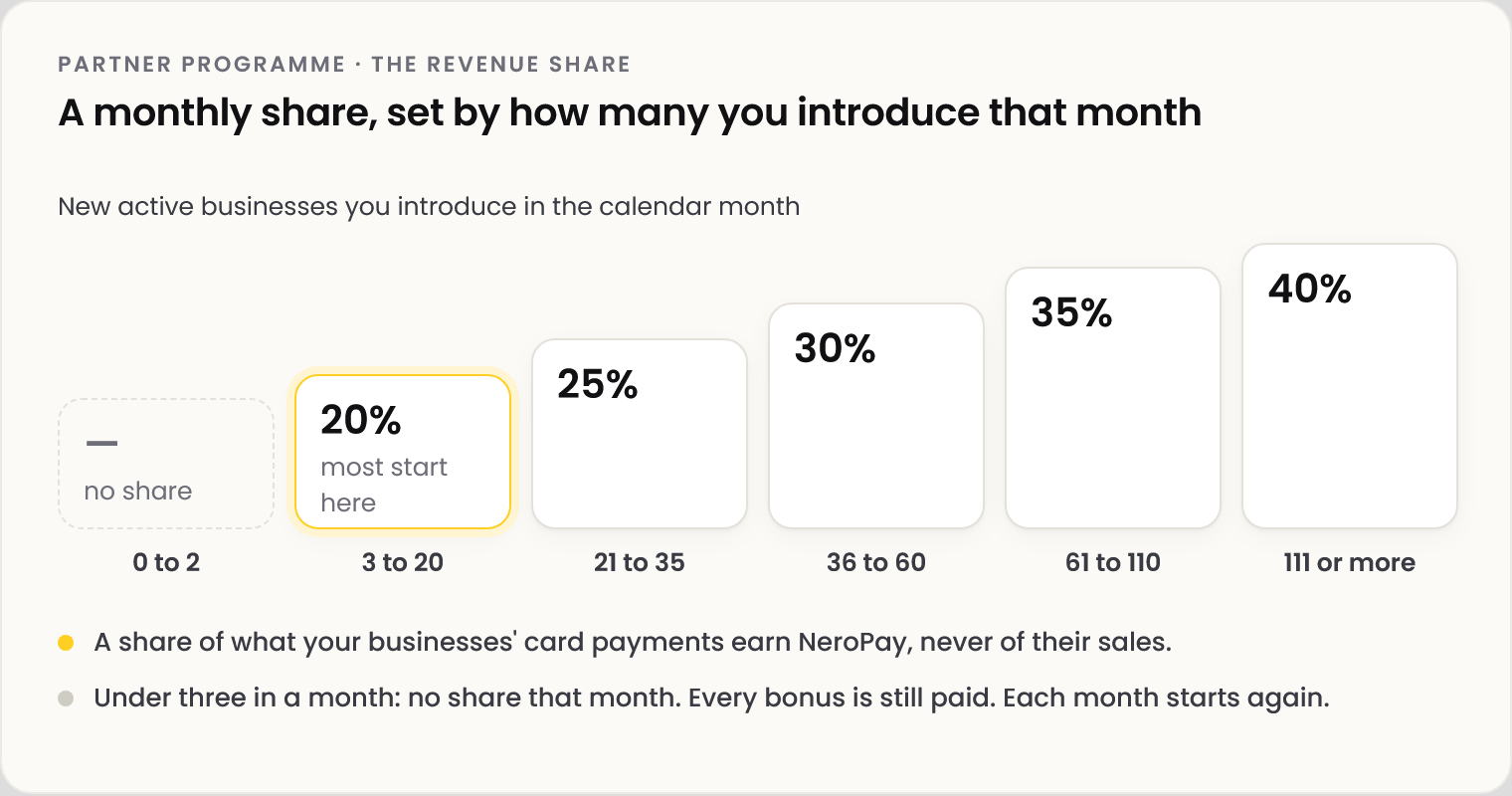
| New active businesses you introduce in the calendar month | Your share that month |
|---|---|
| 3 to 20 | 20% |
| 21 to 35 | 25% |
| 36 to 60 | 30% |
| 61 to 110 | 35% |
| 111 or more | 40% |
⚠️ The share is of what the card payments earn NeroPay. It is never a share of the businesses' own sales or turnover. Fewer than three new active businesses in a month means no revenue share for that month.
An active business is one whose account is enabled and has taken at least one successful payment. The full definitions are in the programme terms at neropay.app/partners.
Your partner dashboard
Go to Partner & Staff → Partner Programme.
| Section | What it shows |
|---|---|
| Referral link and QR code | Yours to share with any business you know |
| Total Referrals | Every business you've introduced and where each one is: signed up, being set up or live |
| Payouts | What has been paid to your partner account. Revenue share appears as Partner Revenue Share transactions |
| Add Business | Add a business that signed up without your link. See Adding a business you introduced |
💡 Note: Bonus paid per verified active business, £100–£300 by its total card takings in its first 30 days. Revenue share needs three or more new active businesses introduced in the same calendar month; the rate depends on how many are introduced that month. Full terms at neropay.app/partners.
Frequently asked questions
Do I need to sell anything or set anything up?
No. NeroPay contacts the business, onboards it, sets it up and supports it. You make the introduction.
When is the bonus paid?
Once the business has been taking card payments with NeroPay for 30 days. The amount is set by its card takings in that time.
What if I introduce fewer than three in a month?
Every business that goes live still brings its bonus. The revenue share applies only in months where you introduce three or more.
Can I join as a company?
Yes. Register under your company and introduce businesses from that account.
A business signed up without my link. What now?
Add it yourself from your dashboard. See Adding a business you introduced.
Still need help? Contact us at support@neropay.app or create a ticket.