NeroConnect keeps two logs. Connect Logs is the payment view — every transaction across your connected accounts, with a breakdown of who received what on each one. Connect API Logs is the technical trace — payment records, notification deliveries, webhook attempts and API requests, kept for up to 12 months. This article explains what each log shows, how to read a transaction's allocation, and why a delivered notification is not the same thing as a successful payment.
Connect Logs — payment activity
Go to NeroConnect → Connect Logs. The attention queue from the dashboard is repeated at the top, then the filters, the status tiles and the transaction list. Results are restricted to accounts owned by your platform.
| Filter | What it narrows |
|---|---|
| Search | Free text across the transaction list |
| Connected account | One merchant, or all |
| Status | One of the ten transaction statuses below |
| Channel | The channel the payment was taken on, for example card terminal |
| Date range | From and to dates |
The ten status tiles
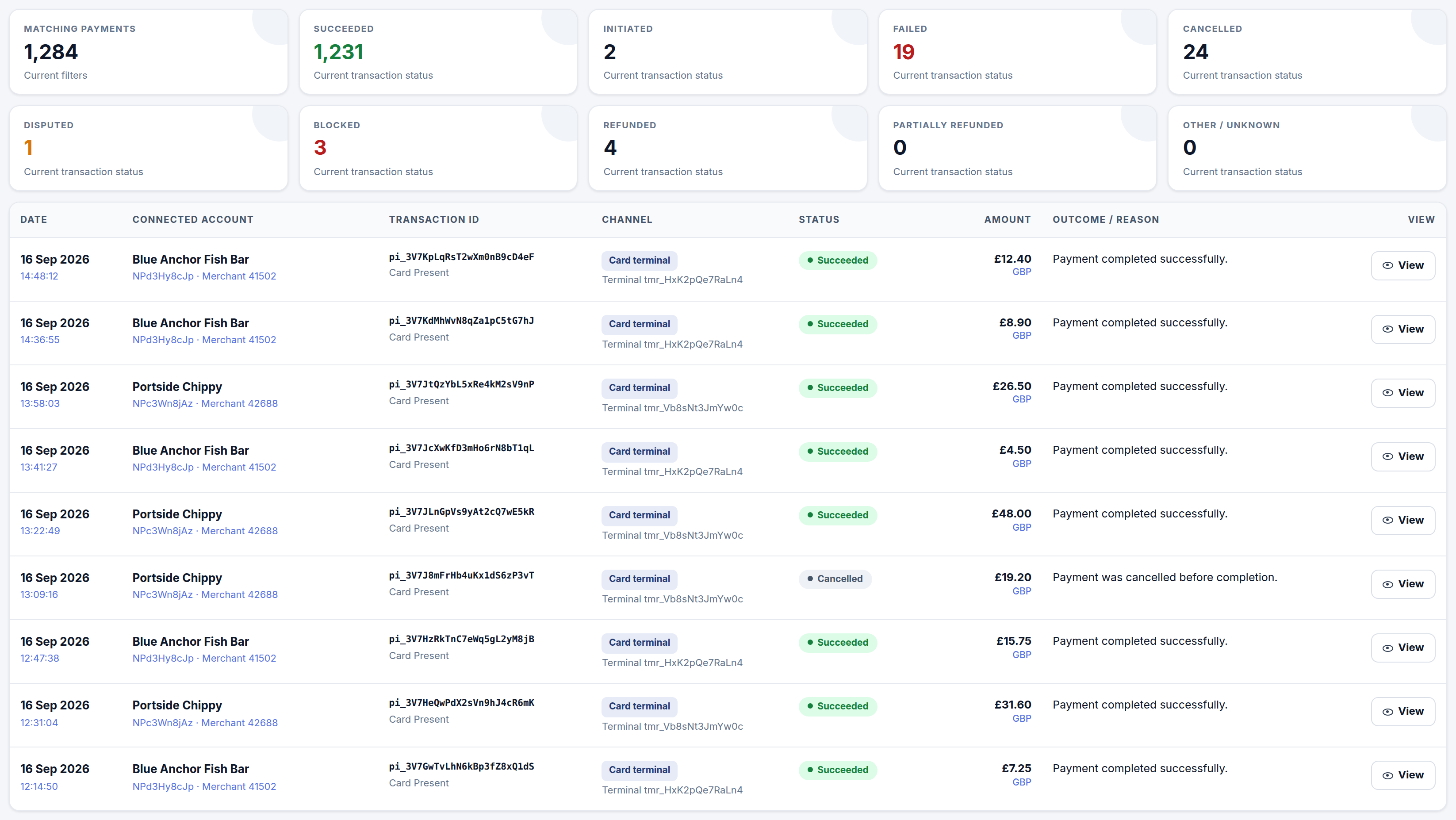
The tiles count the payments matching your current filters, split by current transaction status. The first tile is the total; the other nine add up to it.
| Tile | Means |
|---|---|
| Matching payments | Every payment that matches the current filters, whatever its status |
| Succeeded | Payment completed successfully |
| Initiated | Started but not yet completed |
| Failed | Attempted and did not complete |
| Cancelled | Cancelled before completion |
| Disputed | A chargeback has been raised against the payment |
| Blocked | Stopped before completion by a block |
| Refunded | Refunded in full |
| Partially refunded | Part of the amount refunded |
| Other / unknown | A status outside the nine above |
Each row in the list shows the date and time, the connected account with its account ID and merchant number, the transaction ID and read method, the channel and device, the status, the amount and currency, and a plain-language outcome or reason. View opens the transaction detail.
📸 Connect Logs, showing the ten status tiles above the transaction list, with the channel, status, amount and outcome for each payment. Figures shown are illustrative.
Connected-account payout fee records
A collapsible section beneath the list holds historical payout fee entries that carry no platform allocation. Nothing in them contributes to your margin.
Reading a transaction's payment allocation
The transaction detail panel is built around the payment allocation — five figures that show where one payment went. The terms NCPA and NCPF are the ledger names for the platform fee credit and the NeroPay cost debit.
| Figure | Meaning |
|---|---|
| Customer paid | The original amount the customer was charged |
| Connected kept | What reached the merchant, before card processing costs |
| Platform fee received | Your application fee on this payment — the NCPA credit |
| NeroPay costs | NeroPay's processing cost on this payment — the NCPF debit |
| Platform net margin | Platform fee received less NeroPay costs, for this one payment |
The mode badge
A badge on the panel states whether the platform or the connected account is paying NeroPay's processing fee on this payment. In platform-paid mode the connected account is reduced by your application fee and NeroPay's processing fee is charged separately to your platform balance — which is why Platform fee received and NeroPay costs appear as two separate lines. The arrangement itself is explained in How pricing works — who sets what.
Below the allocation, the panel shows the connected account identity, the payment record, the customer and order (name, contact, order reference, description), the card and terminal (masked card, card profile, read method, location) and any linked references.
⚠️ Sensitive payment credentials are never displayed anywhere in Connect Logs. Cards are shown masked, and if a merchant has typed a card number into a free-text order description, that number is redacted before it is shown.
💡 Note: The allocation is per payment. For period totals, and for the ledger check that NCPA and NCPF agree with the application fees generated, use Reports, wallet and reconciliation.
Connect API Logs — the technical trace
Go to NeroConnect → Connect API Logs. The page is read only and has four tabs. Use it when a merchant's integration reports something different from what Connect Logs shows.
| Tab | Shows |
|---|---|
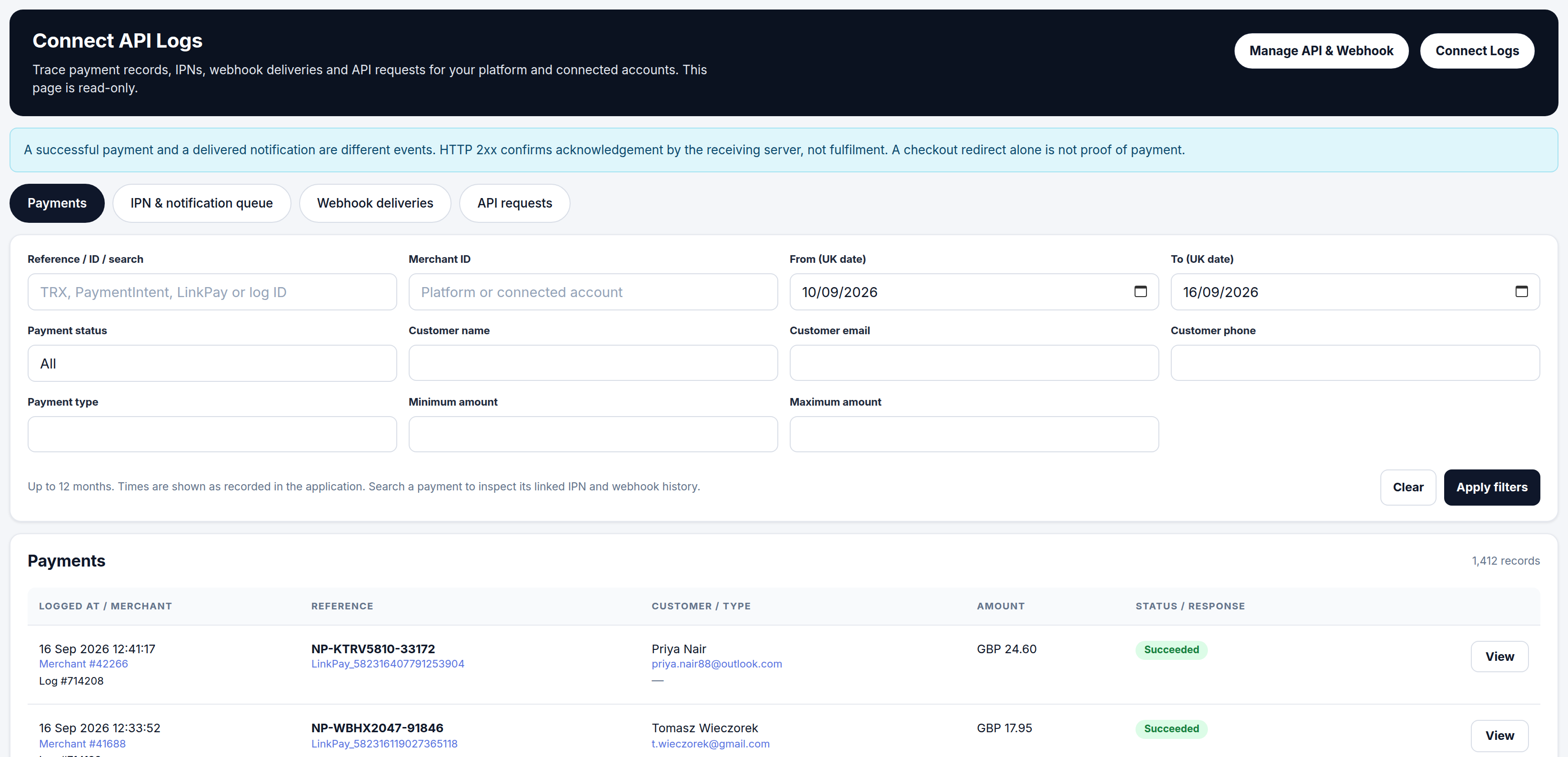
| Payments | Payment records with customer, amount and status. Filter by reference or ID, merchant ID, date range, payment status, customer name, email or phone, payment type, and minimum or maximum amount |
| IPN & notification queue | Each notification event: event name, notification type, delivery status, HTTP code, attempt count and acknowledgement time. Filter by reference or ID, merchant ID, date range, and delivery or HTTP status |
| Webhook deliveries | Outbound webhook attempts and the responses received |
| API requests | Method, endpoint, the acting merchant and the on-behalf-of merchant, and the HTTP code returned |
History is kept for up to 12 months, and times are shown as the application recorded them. Searching a payment on the Payments tab lets you inspect its linked IPN and webhook history.
📸 Connect API Logs on the Payments tab, with the standing reminder banner, the four tabs and the filter panel above the payment records. Figures shown are illustrative.
What an empty tab means
An empty tab states that no recorded logs match the filters. That is not the same as nothing having happened. Historical events cannot be shown if logging was not enabled at the time they occurred, so an empty result for an older date range may mean the trace does not reach back that far. Check the same period in Connect Logs before concluding a payment never took place.
Acting on behalf of a merchant
Your platform can make API calls on behalf of a connected account, and the API reference covers how; the API requests tab is where you see those calls. Each request row shows the merchant pair as Merchant #A → #B — the acting merchant and the on-behalf-of merchant. When both resolve to the connected account, the call was correctly scoped to that merchant. If the pair does not resolve to the account you expected, the call was run as the platform rather than for the merchant — the first thing to check when a merchant's data looks wrong.
A delivered notification is not a payment
The banner at the top of Connect API Logs is the rule most integration queries come down to: a successful payment and a delivered notification are different events. They are recorded separately and can succeed or fail independently.
| What you see | What it proves |
|---|---|
| HTTP 2xx on a notification | The receiving server acknowledged the message. Not that the order was fulfilled |
| A checkout redirect to a success page | The customer's browser was sent on. Not that the payment succeeded |
| Succeeded status on the payment record | The payment completed. This is what fulfilment should be reconciled against |
💡 Note: When a merchant says "the customer saw the thank-you page but the order is missing", check the payment status first, then the IPN & notification queue for that reference. The two tabs answer different questions.
Frequently asked questions
What is the difference between Connect Logs and Connect API Logs?
Connect Logs is the commercial view of each payment — status, amount and how it was allocated between the customer, the merchant, your platform and NeroPay. Connect API Logs is the technical trace of payment records, notifications, webhooks and API requests. Start with Connect Logs for "what happened to this payment" and Connect API Logs for "what did our systems send and receive".
The notification shows HTTP 200 but the merchant's system has no order. Whose fault is it?
A 2xx code means the merchant's server acknowledged receipt. What it did with the message afterwards is on the merchant's side. Confirm the payment status in Connect Logs, then pass the acknowledgement time and reference to the merchant's developer.
Why does the API Logs tab show nothing for a period when I know payments were taken?
Events are only shown if logging was enabled at the time. An empty result means no logs match the filters, not that no activity took place. The payments themselves will still be in Connect Logs.
Why is Platform net margin lower than Platform fee received?
Net margin is your fee less NeroPay's processing cost on that payment. In platform-paid mode those are two separate movements, so the margin is the spread between them. If your pricing is set at cost, the margin reads zero.
Can I see full card numbers for a disputed payment?
No. Cards are always shown masked, and card numbers inside order descriptions are redacted. Dispute evidence is handled through the case in the attention queue, not from card details.
Still need help? Contact us at support@neropay.app or create a ticket.