Additional services are the five per-event charges a merchant can incur on top of its channel rate: SMS, non-UK cards, extra payment methods, instant payouts and refunds. You set the retail price of each; NeroPay prints its own cost — the protected base — beneath the field and applies it as a floor. This article explains what each service is charged for, how flooring works and how the margin appears in Connect Reports.
The five services
Go to NeroConnect → Settings → Pricing and scroll to Additional service pricing. Unlike channel rates, these are not charged on every payment. Each is charged per event, only when the event happens, in addition to whatever channel rate applies. Beneath every field NeroPay prints its protected base, covered below.
| Service | What it is charged for, and when |
|---|---|
| SMS fee | Each SMS sent on the merchant's behalf. Charged per message |
| Non-UK cards — extra fixed fee and extra percentage fee | A payment made with a card issued outside the UK. Both parts are added on top of the channel rate for that payment |
| Extra payment method fixed fee and percent fee | A payment taken through an additional payment method. Both parts apply to that payment |
| Instant payout fixed fee and percent fee | An instant payout requested by the merchant, rather than a standard payout. Both parts apply to that payout |
| Transaction refund fee | Each refund the merchant issues. Charged per refund |
📸 The Additional service pricing block, with the protected base printed beneath each field, followed by default payout limits and the Transaction History fee visibility switch. Figures shown are illustrative.
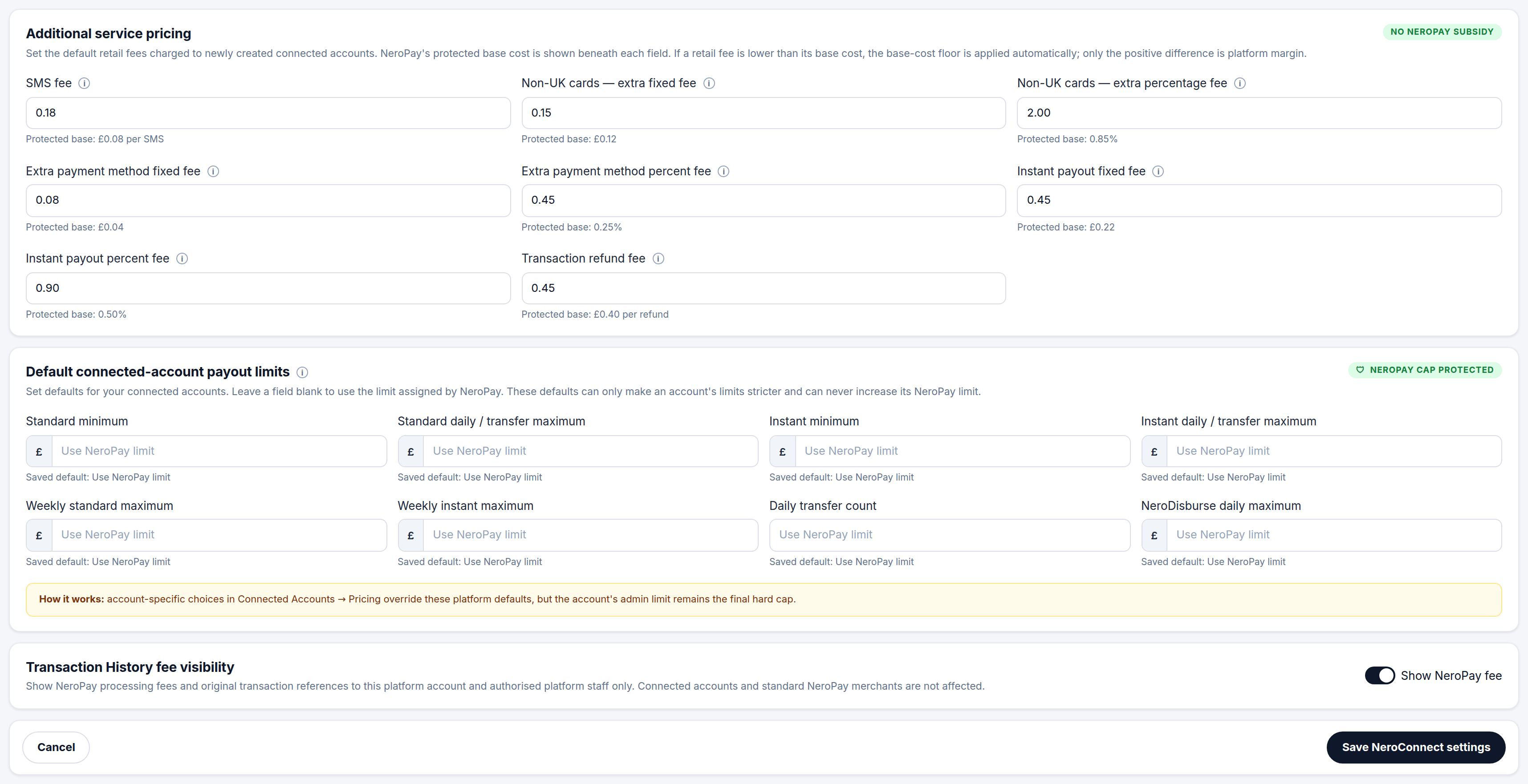
💡 Note: A fixed fee and a percent fee on the same service are both applied to the event. A service with only one field, such as SMS or refund, is a flat charge per event.
The protected base
Beneath every field the page prints Protected base followed by NeroPay's cost for that service. That is what NeroPay charges you when the event happens. It is visible only in-product, to your platform, and it is the floor beneath your retail price.
| You enter | What is applied |
|---|---|
| A retail fee above the protected base | Your fee. The difference between it and the base is your margin on that event |
| A retail fee exactly at the protected base | Your fee, which equals the base. The service is passed through at cost with no margin |
| A retail fee below the protected base | The base, applied automatically in place of your value. The service cannot be sold at a loss through this screen |
Flooring is silent — the page does not refuse the value, it replaces it. If a saved figure is not the one you typed, it was below the base for that field. Only funded positive margin is credited to your platform; there is no negative margin to carry.
⚠️ The base is NeroPay's cost and can only be read here, not changed. Setting every service at its base means you earn nothing on additional services, which is a valid choice but is worth making deliberately.
What 0.00% margin means
A service priced exactly at its protected base shows a margin of 0.00% in Connect Reports. That is correct, not a fault: you are reselling the service at exactly NeroPay's base cost. The Dashboard's platform application fees figure behaves the same way for channel pricing — it reads zero whenever merchant pricing is set at cost.
Platform default or per-account override
The fields on the Pricing tab are your platform defaults, applied to merchants created from that point on. To price one merchant differently, go to NeroConnect → Connected Accounts, open the account and use the Merchant pricing tab. The additional service fields there are the same, and the same protected base and flooring apply.
Precedence, from weakest to strongest
- Your platform default for that service
- The account's own value on its Merchant pricing tab, which overrides the default
- NeroPay's protected base, which floors both
💡 Note: Platform defaults save with Save NeroConnect settings at the foot of the Pricing tab. An account's Merchant pricing tab saves separately inside the account panel. An older account whose pricing fields are all zero inherits your platform default for that payment kind until a value is set on the account.
How it appears in Connect Reports
Go to NeroConnect → Connect Reports. The Additional service economics block shows three headline figures — platform earned, NeroPay base cost and platform keeps — then a per-service table. The Additional service margin tile higher up the page restates the settled total.
| Column | Means |
|---|---|
| Earned | What merchants were charged for that service in the selected dates |
| Base cost | What NeroPay charged you for the same events |
| Platform margin | Earned less base cost |
| Margin percentage | The margin expressed as a percentage. 0.00% means resold at exactly base |
| Settled entries | The number of successfully settled ledger entries behind the row |
Only successfully settled ledger entries count, and a service row appears only once that service has been used by at least one merchant in the period. A service you have priced but no merchant has triggered does not appear. Filters at the top of the page — date range, channel and single connected account — apply to this block as they do to the rest of the report. See Reports, wallet and reconciliation.
Frequently asked questions
Why did the fee I entered change after saving?
It was below the protected base printed beneath that field, so the base was applied instead. Enter a figure at or above the base to keep your own value.
Are additional services charged on every payment?
No. They are charged per event, only when the event happens — an SMS sent, a non-UK card used, an extra payment method taken, an instant payout requested or a refund issued. Channel rates are the per-payment charge.
Can I see the protected base without opening settings?
The base cost behind each service is restated in Connect Reports under Additional service economics as base cost per service. The field-by-field values are on the Pricing tab and on each account's Merchant pricing tab.
A service I priced is missing from the Additional service economics table.
A row appears only once the service has been used and settled inside the selected dates. Widen the date range or check whether any merchant has triggered that service.
Does the platform default change existing merchants?
No. Defaults apply to merchants created after the change. Open an existing account and use its Merchant pricing tab. The exception is an older account with all-zero pricing, which inherits the default.
Still need help? Contact us at support@neropay.app or create a ticket.