NeroConnect can email your team when a connected account needs something from you — a dispute response, a compliance document, proof of a payment — or when a merchant submits a refund. All four notifications are off by default and go only to the addresses you choose. This article explains what each one fires on, what it deliberately leaves out, and how the emails relate to the attention queue on your dashboard.
The four platform notifications
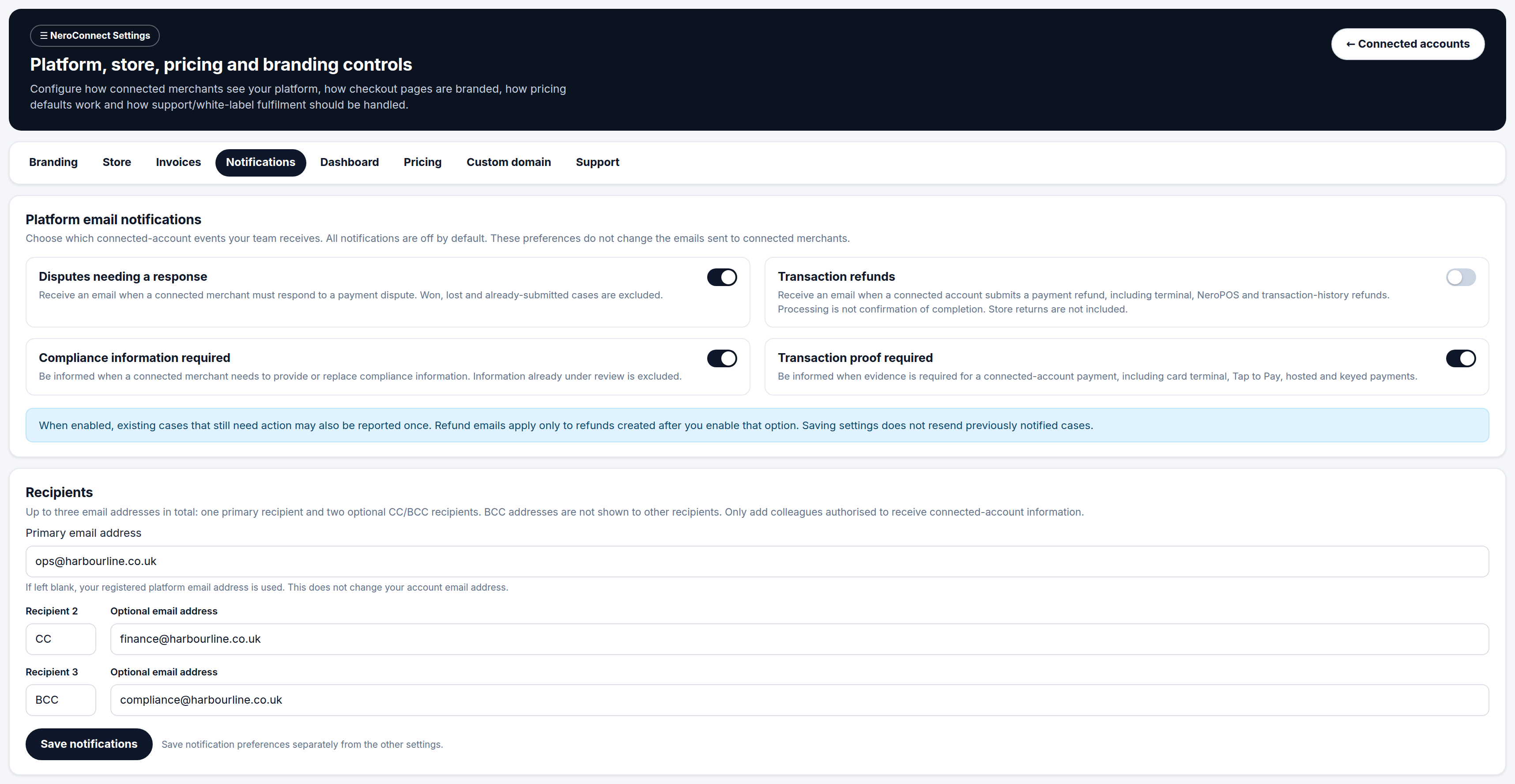
Go to NeroConnect → Settings → Notifications. The Platform email notifications block lists four switches. They are independent of anything your merchants receive — turning one on or off changes what your team is emailed, never what a connected account is emailed.
| Notification | Fires when | Does not include |
|---|---|---|
| Disputes needing a response | A connected merchant must respond to a payment dispute | Won cases, lost cases and cases where a response has already been submitted |
| Transaction refunds | A connected account submits a payment refund — terminal, NeroPOS or transaction-history refunds | Store returns. The email confirms a refund was submitted, not that it completed |
| Compliance information required | A connected merchant needs to provide or replace compliance information | Information already submitted and under review |
| Transaction proof required | Evidence is requested for a connected-account payment — card terminal, Tap to Pay, hosted or keyed | Payments where no evidence has been requested |
💡 Note: A refund notification means processing has started on the merchant's side. It is not confirmation that the money has reached the customer — check the transaction in Connect Logs for the current status.
📸 The Notifications tab, with the four platform email switches above the recipient fields and the separate Save notifications button.
Recipients
Every enabled notification goes to the same set of addresses. You can add up to three in total.
| Field | What to enter |
|---|---|
| Primary email address | The main inbox for connected-account alerts. Left blank, your registered platform email address is used — this does not change your account email |
| Recipient 2 | Optional. Choose CC or BCC, then the address |
| Recipient 3 | Optional. Choose CC or BCC, then the address |
BCC addresses are not shown to the other recipients. Because these emails carry connected-account information, only add colleagues who are authorised to receive it.
⚠️ Recipients apply to all four notifications together. There is no per-notification recipient list, so a finance inbox added for refunds will also receive dispute and compliance alerts if those are switched on.
What happens when you enable a notification
Three rules decide what lands in the inbox after you switch a notification on. They are worth knowing before you enable anything, because the first email may not be about a new event.
| Behaviour | What it means for you |
|---|---|
| Existing open cases may be reported once | Turning on disputes, compliance or transaction proof can email you about cases that were already waiting before you enabled it. Expect a small batch on day one |
| Refund emails are forward-only | Only refunds created after you enable the option are emailed. Earlier refunds are never sent retrospectively |
| Saving never resends | Pressing Save notifications again, or changing recipients, does not re-issue emails for cases already notified |
Saving this tab
Notification preferences have their own button, Save notifications, at the foot of the tab. They are not included in the Save NeroConnect settings button that most other tabs share. If you edit notifications and then save from another tab, the notification changes are lost.
💡 Note: A new recipient will not receive emails for cases that were notified before they were added. If they need the current backlog, point them at the attention queue on the dashboard rather than waiting for an email.
Notifications and the attention queue
Three of the four notifications map directly onto the counters in Connected accounts needing attention at the top of the NeroConnect Dashboard: Disputes, Transaction proof and Compliance. The email tells you something has arrived; the queue is where you see everything still outstanding, with the merchant, case reference, amount and the hard respond by time in UK time.
| Email notification | Dashboard attention queue | |
|---|---|---|
| Tells you | A case has been raised | Every case still open, with its deadline |
| Timing | Once, when the case arrives | Live — cases drop off when closed or under review |
| Covers refunds | Yes, if enabled | No |
| Needs enabling | Yes — all off by default | No — always on |
The queue runs independently of any date filter and excludes closed cases and anything already under review, so an empty queue means nothing is outstanding. How to work each case type is covered in Accounts needing attention.
⚠️ "Needs response" means you are expected to chase the merchant. NeroConnect does not answer a dispute on a merchant's behalf, and a notification email does not extend the respond-by deadline.
Recommended setup
Because all recipients receive every enabled notification, the practical choice is which switches to turn on for the team that reads the shared inbox. A common arrangement is below.
| Role | Which notifications |
|---|---|
| Operations or merchant support lead | Disputes needing a response, Transaction proof required — anything with a deadline the merchant must be chased on |
| Compliance or onboarding owner | Compliance information required |
| Finance | Transaction refunds, where refund volume is low enough to read case by case |
| Small team, one inbox | Disputes, Compliance and Transaction proof on; Refunds off unless you need a record of every refund by email |
Use the primary address for the person who owns the response, and CC or BCC for anyone who only needs visibility. Terms used here are defined in the Glossary and key terms.
Frequently asked questions
I turned on dispute notifications and received emails about disputes from before today. Is that a fault?
No. When a notification is enabled, existing cases that still need action may be reported once. They are the open cases already in your attention queue. You will not receive them again.
Will my merchants be emailed when I switch these on?
No. These preferences only control emails to your platform team. The emails sent to connected merchants are unaffected by this tab.
I changed the recipients but nothing saved. Why?
The Notifications tab saves with its own Save notifications button. Saving from another tab with Save NeroConnect settings does not include notification changes. Return to the tab, make the change again and press Save notifications.
Can different people receive different notifications?
Not from this tab. All recipients receive every notification that is enabled. If teams need different alerts, route the primary address to a shared inbox and filter from there.
Does a refund email mean the customer has their money back?
No. It means a connected account submitted a refund. Processing is not confirmation of completion — check the transaction in Connect Logs for its current status. Store returns are handled separately and do not trigger this email.
Still need help? Contact us at support@neropay.app or create a ticket.