Your partnership mode is the arrangement agreed with NeroPay for who pays its processing fee: your platform account, or each connected account directly. It changes where money is collected from and how much you carry, but not what your merchants are charged — that is yours to set in either mode. This article compares the two, explains the separate monthly-fee arrangement, and points to the other choices that shape your platform.
The two arrangements
NeroPay charges a processing fee on every payment a connected account takes. The partnership mode decides who that fee is collected from.
| Mode | What happens on each payment |
|---|---|
| Platform account pays | The connected account is reduced by your fee. NeroPay's processing cost is charged separately to your platform balance, so you bill your merchants yourself and keep the spread between the two |
| Connected account pays | NeroPay collects its processing cost from the merchant directly. Your own fee is stacked on top, itemised, and credited to you |
Your Pricing tab describes the platform-paid arrangement as the one with greater margin potential: because you sit between NeroPay's cost and the merchant's price, you have more freedom over what the merchant sees and keep the difference. The trade is exposure — the processing cost is drawn from your funds.
How the two compare
| Platform account pays | Connected account pays | |
|---|---|---|
| Money flow | Your fee is taken from the connected account; NeroPay's cost is debited from your platform balance | NeroPay's cost is taken from the connected account; your fee is credited to you on top |
| Merchant experience | The merchant sees the price you set | The merchant sees NeroPay's processing fee with your fee itemised on top |
| Your exposure | You carry the spread. Processing draws on cleared platform funds and the Connect reserve, so the reserve balance matters day to day | NeroPay's processing cost is not drawn from your balance |
| Reporting | Connect Reports shows NCPA credited against NCPF debited, with net margin as the difference | The same tiles and trend apply; the fee-responsibility summary and the mode badge on each transaction state which arrangement was in force |
| Merchant pricing | Set by you | Set by you |
💡 Note: Platform-paid processing uses cleared platform funds and the dedicated Connect reserve only. If those cannot cover a payment's NeroPay cost, that individual payment falls back to connected-account collection instead of creating an unfunded NeroPay balance. Keeping the reserve topped up is what keeps platform-paid processing running when your main balance is thin.
You set merchant pricing in both modes
The mode decides where NeroPay collects its cost. It does not decide what your merchants pay. In both arrangements you set the rate per payment channel and each additional service fee, as a platform default under NeroConnect → Settings → Pricing and per merchant on the account's Merchant pricing tab. The only floor is NeroPay's protected base, which applies automatically to additional services. See How pricing works — who sets what.
Your Pricing tab notes that the visible inputs change depending on who pays NeroPay processing fees, so the layout you see may differ from a platform on the other arrangement. The controls that remain are yours in either case.
Where to see it, and how to change it
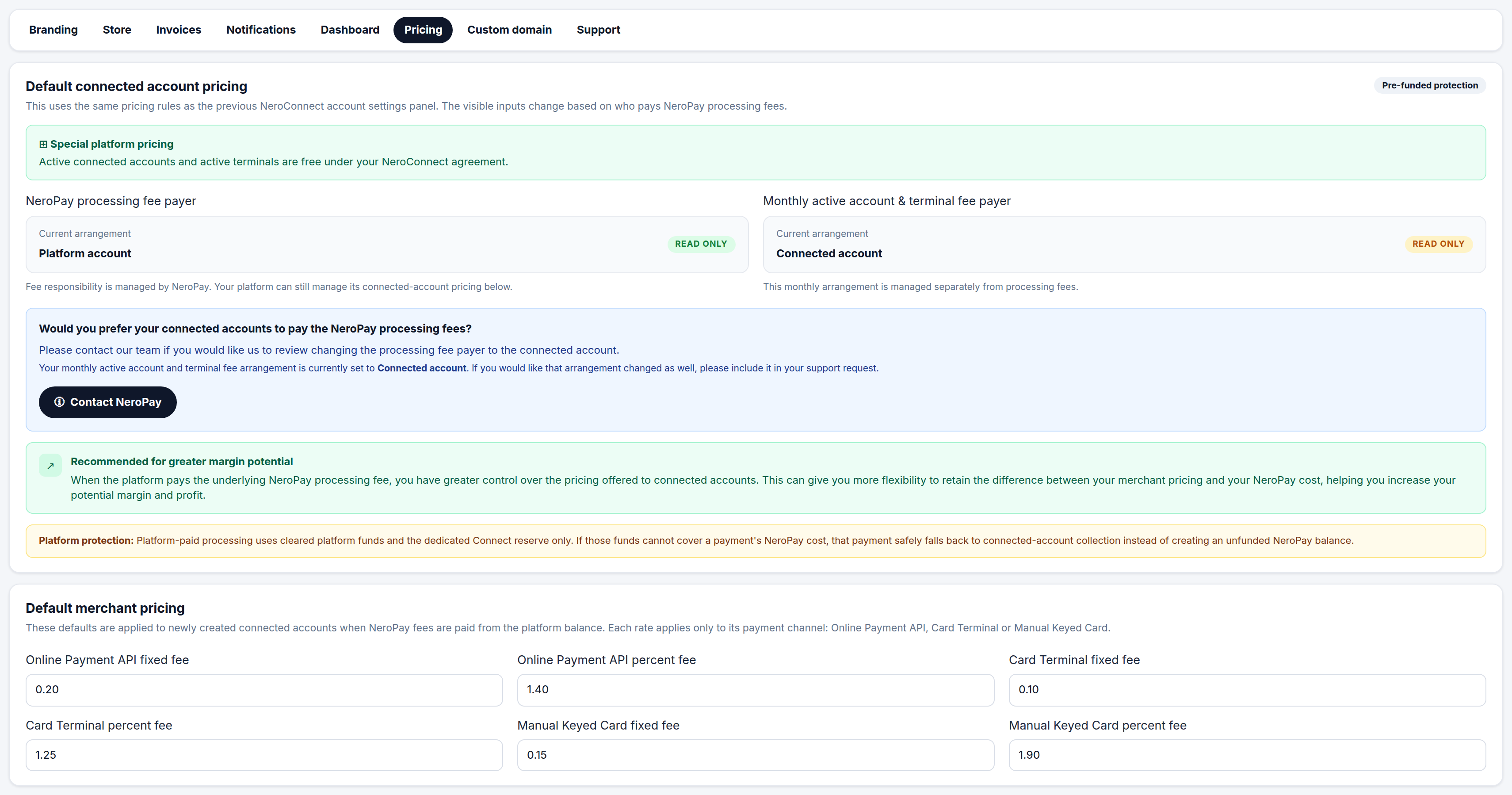
Go to NeroConnect → Settings → Pricing. The first two panels, NeroPay processing fee payer and Monthly active account & terminal fee payer, are marked read only because NeroPay owns them. Each shows your current arrangement. The arrangement is agreed at onboarding and cannot be edited from this screen.
| Step | What happens |
|---|---|
| 1 | Below the read-only panels, press Contact NeroPay to raise a request to change the processing fee payer |
| 2 | If you also want the monthly arrangement changed, say so explicitly in the same request — it is handled separately and does not follow automatically |
| 3 | NeroPay reviews the request. Once changed, the panels update and the Connected Accounts header banner restates the arrangement in plain language |
📸 The Pricing tab: the two read-only arrangement panels, the request route to NeroPay, and your default merchant pricing beneath. Figures shown are illustrative.
⚠️ A change to the monthly arrangement has to be requested explicitly. Asking to change the processing fee payer alone leaves the monthly arrangement as it is.
The monthly fee arrangement
Separately from processing, NeroPay charges monthly active account and terminal fees. Who pays these is the second read-only panel. Charged to the connected account first; where the merchant cannot cover it, the charge falls back to your platform balance.
Because it is managed separately, a platform can be on one arrangement for processing and another for monthly fees. Both are restated on the Connected Accounts header and in the fee-responsibility summary in Connect Reports, so you can confirm what is in force without opening settings.
Other choices that shape your platform
Two further settings are often described as "modes". Neither is agreed with NeroPay — both are yours to change at any time.
| Choice | Options and where to set it |
|---|---|
| Branding depth | Full white label, or the NeroPay logo shown at checkout. Controlled by the Show NeroPay logo on checkout page switch under Settings → Branding: off for full white label, on where the NeroPay mark adds payment credibility. See Getting started — branding and your custom domain |
| Store mode | Three mutually exclusive options under Settings → Store: NeroPay original (the standard NeroPay hardware store and branding), White-label platform (your branding, neutral product names and unbranded images), or Hide store (no store links or terminal prompts for connected accounts). See The white-label store |
💡 Note: Branding depth and store mode are independent of each other and of the fee arrangement. A platform can run full white label with the store hidden, or show the NeroPay logo at checkout while running a white-label store.
Frequently asked questions
Which mode is my platform on?
Go to NeroConnect → Settings → Pricing and read the Current arrangement in the NeroPay processing fee payer panel. The same arrangement is restated on the Connected Accounts header banner and beside the ledger trend in Connect Reports.
Can I switch modes myself?
No. Both arrangements are agreed with NeroPay and shown read only. Use the Contact NeroPay button on the Pricing tab to request a change, and state explicitly if you want the monthly arrangement changed as well.
If the connected account pays NeroPay's fee, can I still charge my own?
Yes. Your fee is stacked on top of NeroPay's processing cost, itemised to the merchant and credited to you. Merchant pricing is yours in both modes.
What happens if my platform balance cannot cover a payment's processing cost?
That individual payment falls back to connected-account collection rather than creating an unfunded NeroPay balance. Platform-paid processing draws only on cleared platform funds and the Connect reserve, which is why the reserve balance on the Dashboard matters.
Does the mode change who deals with disputes?
No. In every mode the platform is expected to chase its merchant for a dispute response before the deadline shown in the attention queue. See Accounts needing attention.
Still need help? Contact us at support@neropay.app or create a ticket.