Connect Support has two parts: the help you can reach right now, and the plan that decides who answers your merchants. On the Free plan your own team handles merchant tickets, shipping questions and device set-up. On Premium, NeroPay handles them under your platform's support flow, white-labelled. This article compares the two plans, explains how Premium is billed, and what changes for hardware orders on each.
Getting help now
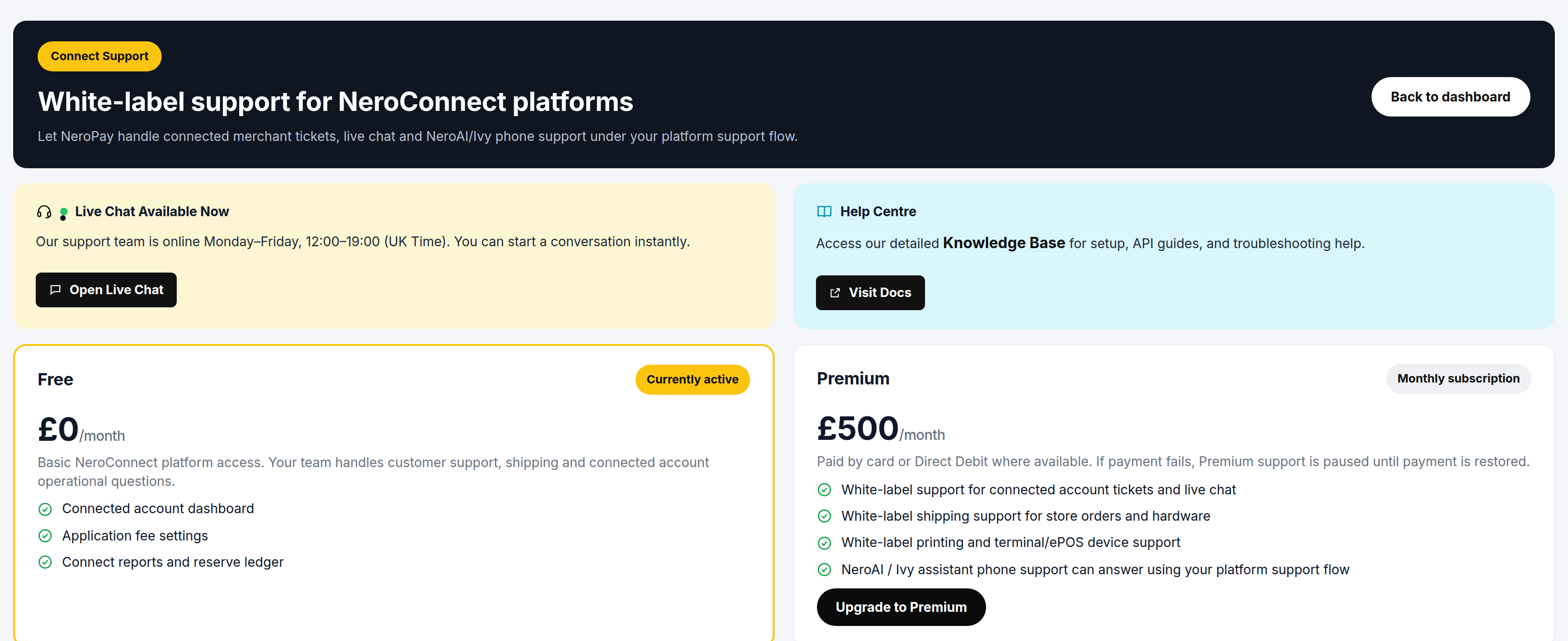
Go to NeroConnect → Connect Support. Two routes sit at the top of the page, above the plan comparison. Both are available on either plan.
| Route | When to use it |
|---|---|
| Live chat | A question about your platform account that needs a person. Available during the UK hours published on the screen; press Open Live Chat to start a conversation |
| Knowledge base | Set-up, integration guides and troubleshooting, any time. Press Visit Docs |
Outside live chat hours, contact support@neropay.app or create a ticket.
💡 Note: Live chat is for you as the platform. Whether your merchants can also reach NeroPay directly, under your brand, is what the support plan decides.
Free and Premium compared
Every platform starts on Free. The plan currently in force is marked Currently active on the Connect Support screen and is also shown in the platform wallet block on the NeroConnect Dashboard.
| Free | Premium | |
|---|---|---|
| Connected account dashboard | Included | Included |
| Application fee settings | Included | Included |
| Connect reports and reserve ledger | Included | Included |
| Ticket and live-chat support for connected accounts | Your team | NeroPay, white-labelled |
| Shipping support for store orders and hardware | Your team | NeroPay, white-labelled |
| Printing and terminal or EPOS device support | Your team | NeroPay, white-labelled |
| Assistant phone support under your support flow | Not included | Included |
| Who handles merchant operational questions | Your team | NeroPay, under your platform support flow |
The platform features — the connected account dashboard, fee settings, reports and the Connect reserve ledger — are the same on both plans. Premium does not unlock product features; it moves the support workload from your team to NeroPay while keeping your brand in front of the merchant.
📸 The Connect Support screen, with live chat and the knowledge base above the Free and Premium plan cards. Figures shown are illustrative.
Billing for Premium
Premium is a monthly subscription. The price is shown on the Connect Support screen, and you start it by pressing Upgrade to Premium on the Premium card.
| Question | Answer |
|---|---|
| How often is it charged | Monthly |
| How is it paid | Card, or Direct Debit where available |
| What if a payment fails | Premium support is paused until payment is restored. The plan is not cancelled |
| Where the price is shown | On the Premium card of the Connect Support screen |
⚠️ While Premium is paused for a failed payment, the white-label services are not provided, so merchant tickets, shipping and device questions fall back to your team. Restore the payment method promptly if your merchants rely on the white-label service.
What changes for hardware orders
The plan does not affect whether an order is fulfilled. It affects how the device is prepared before it ships.
| Free | Premium | |
|---|---|---|
| Connected-account orders fulfilled | Yes | Yes |
| Custom white-label preparation before shipping | Only when you place the order yourself | Yes, for connected-account orders |
| Shipping and device questions from merchants | Your team | NeroPay, white-labelled |
On Free, a device a merchant orders through your store ships without custom white-label preparation. If you want devices prepared under your brand without Premium, place the order from your platform account rather than letting the merchant order it. How the store itself is branded is a separate setting, covered in The white-label store.
💡 Note: Fulfilment and return approvals are handled by NeroPay on both plans. Connect Orders is a tracker for those orders, not a fulfilment console.
The Support status panel in Settings
Go to NeroConnect → Settings → Support. The tab mirrors the Connect Support screen as a status panel: whether Premium Connect Support is active, and what that means for how devices ordered by your merchants are prepared. It is there so the current state is visible alongside your other platform settings; the plan itself is managed from Connect Support.
Where white-label preparation alerts surface
Wherever a merchant is linked to your platform, NeroPay's own order handling carries a connected-account badge and a white-label preparation alert — in staff order management, in staff task context and in admin order emails. The alert follows from the merchant being linked to your platform, so the people handling the order see it without you having to raise it.
Frequently asked questions
Do I lose any NeroConnect features on the Free plan?
No. The connected account dashboard, application fee settings, Connect Reports and the reserve ledger are included on both plans. Premium changes who handles support for your merchants, not what the platform can do.
My Premium payment failed. Have I been downgraded?
No. Premium support is paused until the payment is restored, not cancelled. During the pause your team handles merchant tickets and device questions as on Free. Update the card or Direct Debit and the service resumes.
A merchant ordered a terminal while I was on Free. Will it arrive branded for my platform?
The order is fulfilled, but the device ships without custom white-label preparation. To have devices prepared under your brand on Free, place the order yourself from the platform account.
Can my merchants use the live chat on the Connect Support screen?
The live chat on that screen is your route as the platform. White-label ticket and live-chat support for connected accounts is part of the Premium plan.
How much does Premium cost?
The current monthly price is shown on the Premium card of the Connect Support screen, alongside the Upgrade to Premium button.
Still need help? Contact us at support@neropay.app or create a ticket.