How to get there
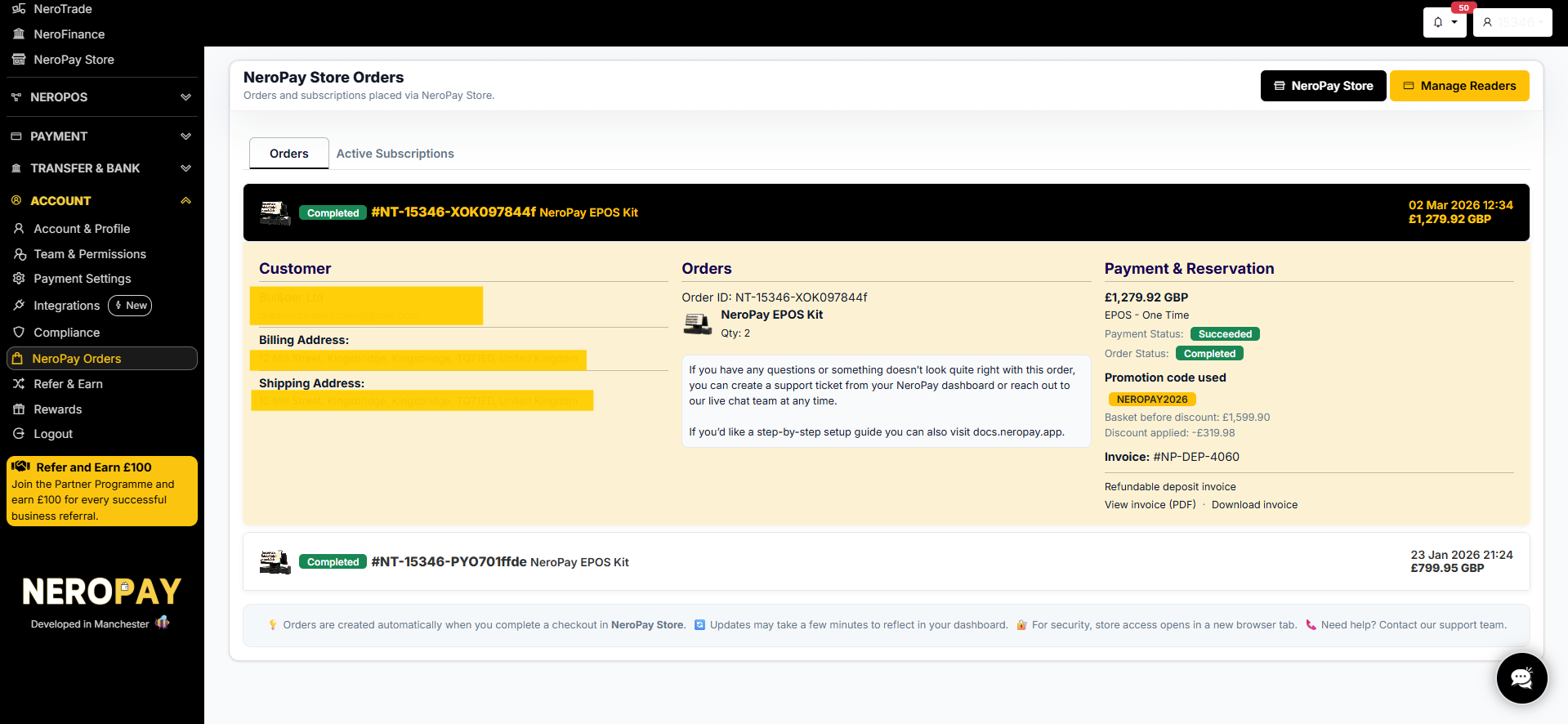
From your dashboard, follow this path: Account → NeroPay Orders
The Orders page
The page is divided into two tabs:
- Orders — a list of all completed and pending hardware or one-time orders
- Active Subscriptions — a list of any recurring subscription plans currently active on your account
From this page you can also navigate directly to the NeroPay Store or manage your card readers by clicking Manage Readers in the top right corner.
📸
Reading an order
Each order in the list shows the order reference number, product name, order date, and total amount. Click any order to expand the full details, which are divided into three sections:
Customer Your name, billing address, and shipping address as recorded at the time of purchase.
Orders The order ID, product name, and quantity ordered.
Payment & Reservation A full breakdown of the transaction:
| Field | What it shows |
|---|---|
| Amount | The total charged in GBP |
| Payment type | e.g. EPOS — One Time |
| Payment Status | Whether payment succeeded — e.g. Succeeded |
| Order Status | The fulfilment status — e.g. Completed |
| Promotion code used | Any discount code applied at checkout |
| Basket before discount | The original total before any discount |
| Discount applied | The amount deducted |
| Invoice | The invoice reference number |
| Invoice type | e.g. Refundable deposit invoice |
| View / Download invoice | Links to view or download the invoice as a PDF |
Active Subscriptions
Click the Active Subscriptions tab to view any recurring plans linked to your account, such as software subscriptions or terminal rental plans. From here you can review subscription status and manage your plan.
Need help with an order?
If something does not look right with your order:
- Create a support ticket from your dashboard — go to Account → Help & Support → + Create Ticket
- Or contact the live chat team directly from your dashboard
💡 For step-by-step setup guides for your hardware, visit docs.neropay.app.
⚠️ Orders are created automatically when you complete a checkout in NeroPay Store. Updates may take a few minutes to appear in your dashboard. For security, NeroPay Store opens in a new browser tab.
Frequently asked questions
Q: Where do I find my invoice? A: Open the order in the NeroPay Orders page and click View invoice (PDF) or Download invoice in the Payment & Reservation section.
Q: Can I cancel or return a hardware order? A: Contact the NeroPay support team via Help & Support → Create Ticket. Include your order reference number and reason for the request.
Q: What does "Refundable deposit invoice" mean? A: Some hardware orders include a refundable deposit. This invoice records the deposit amount, which may be returned when the hardware is returned in good condition.
Q: My order status has not updated — what should I do? A: Updates may take a few minutes to reflect in your dashboard. If the status has not changed after some time, contact support with your order reference number.
Still need help? Contact us at support@neropay.app or create a ticket from your dashboard.