How to get there
From your dashboard, follow this path: Account → Refer & Earn
Dashboard summary
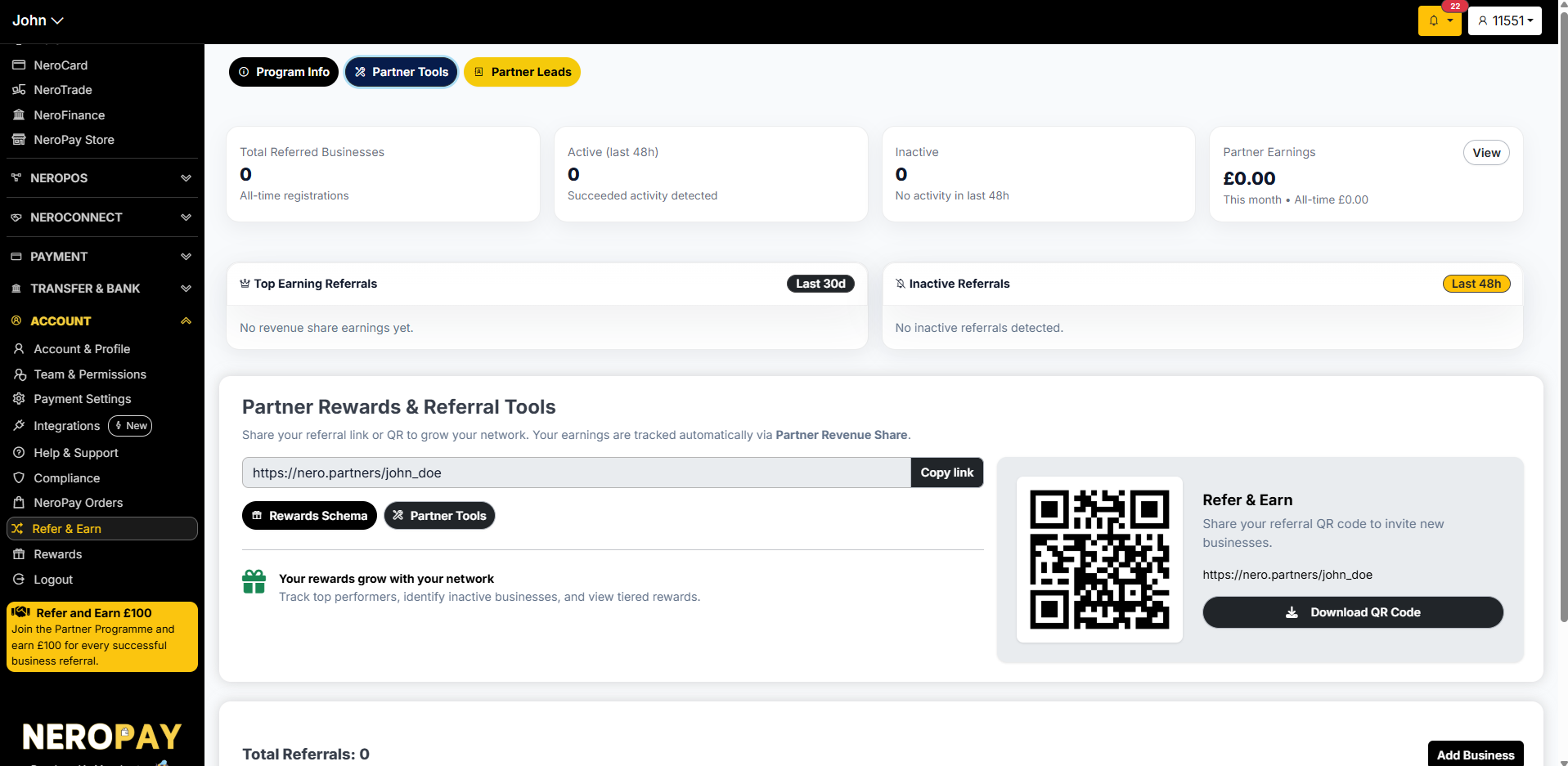
At the top of the page you will see a live snapshot of your referral activity:
| Metric | What it shows |
|---|---|
| Total Referred Businesses | All-time number of businesses registered through your referral link |
| Active (last 48h) | Businesses with successful payment activity detected in the last 48 hours |
| Inactive | Businesses with no activity detected in the last 48 hours |
| Partner Earnings | Your earnings this month and all-time total — click View to see the full breakdown |
Below the summary, you will also see:
- Top Earning Referrals — your highest-earning referrals over the last 30 days
- Inactive Referrals — businesses referred by you that have had no activity in the last 48 hours
📸
Sharing your referral link
Your unique referral link is displayed in the Partner Rewards & Referral Tools section. You can share it in two ways:
Referral link Click Copy link to copy your unique URL and share it by email, WhatsApp, or social media.
Referral QR code A QR code linked to your referral URL is displayed on the right side of the page. Click Download QR Code to save it as an image — you can print it or share it digitally.
Partner tools
Two buttons are available in the Partner Rewards & Referral Tools section:
- Rewards Schema — view the tier structure and how your earnings are calculated
- Partner Tools — access additional resources for growing your referral network
Adding a referred business
To manually add a business to your referral list:
- Scroll to the Total Referrals section at the bottom of the page
- Click Add Business
- Enter the business details to register them under your referral
Tracking your referrals
The page has three tabs for monitoring your network:
| Tab | What it shows |
|---|---|
| Program Info | Overview of how the programme works and your current tier |
| Partner Tools | Resources and tools to help grow your referral network |
| Partner Leads | A list of businesses you have referred and their current activity status |
Frequently asked questions
Q: How do I earn from referrals? A: When a business you refer signs up and processes payments through NeroPay, you earn a share of the revenue they generate. Your earnings are tracked automatically via Partner Revenue Share.
Q: Where can I see my earnings? A: Click View next to Partner Earnings at the top of the Refer & Earn page to see a full breakdown of your earnings by month and all-time.
Q: What counts as an active referral? A: A referred business is considered active if it has had successful payment activity detected within the last 48 hours.
Q: Can I share my QR code in print? A: Yes. Click Download QR Code to save the image and include it in printed materials such as flyers or posters.
Still need help? Contact us at support@neropay.app or create a ticket from your dashboard.