You can run your terminal in another language and print receipts in one or two languages. This helps when your team, your kitchen or your customers read a language other than English.
Change the terminal language
On the terminal, go to More → Language and choose a language.
| Language | Shown as |
|---|---|
| English | English |
| Chinese | 简体中文 |
| German | Deutsch |
| Spanish | Español |
| Italian | Italiano |
| Dutch | Nederlands |
| French | Français |
| Turkish | Türkçe |
💡 Note: the language changes the screens, not your currency. Payments are still taken in pounds.
Print receipts in two languages
Go to Terminal Settings → Receipt Settings. You will be asked for your PIN.
| Setting | What it does |
|---|---|
| Print language | The main language printed on receipts |
| Second print language | A second language, or None to print in one language only |
| One paper, two languages | Prints each line in both languages on a single receipt |
| Two papers, one language each | Prints two receipts, one in each language |
📸 The two layouts: both languages on one receipt, or one receipt per language.
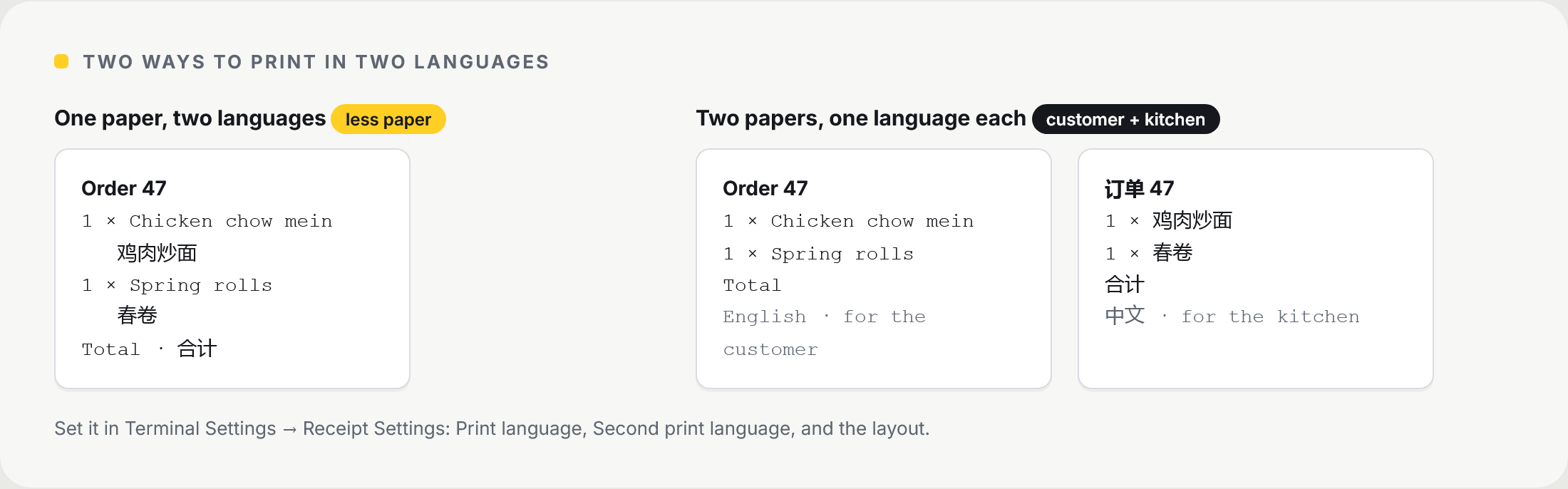
Choose your layout and save.
💡 Note: a takeaway might print one receipt in English for the customer and one in Chinese for the kitchen.
Frequently asked questions
Which languages are available?
English, Chinese, German, Spanish, Italian, Dutch, French and Turkish.
Does changing the language change prices or currency?
No. Only the words on screen and on receipts change. Amounts stay in pounds.
Can each terminal use a different language?
Yes. The language is set on each terminal, so the till and a second terminal can run in different languages.
Will two receipts use more paper?
Yes. Two papers prints two receipts per sale. One paper with both languages uses less.
Still need help? Contact us at support@neropay.app or create a ticket.