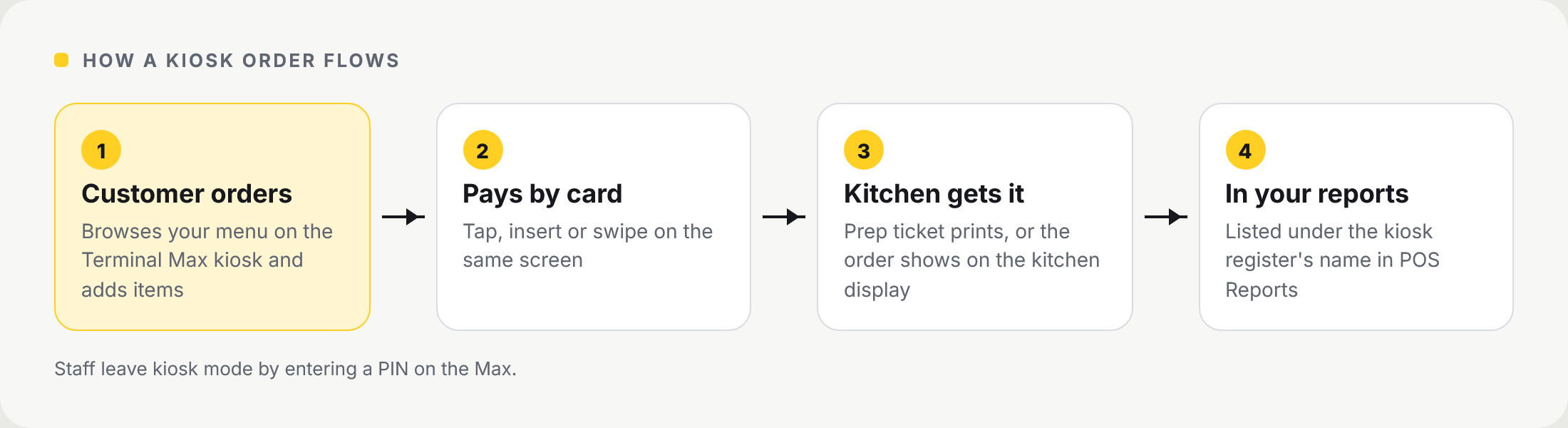
Turn a NeroPay Terminal Max into a self-service kiosk so customers can browse your menu, order and pay at the counter. Kiosk orders reach your kitchen like any other order, and they show in your reports under the kiosk's own register.
📸 How a kiosk order flows, from the customer ordering to your reports.
Before you start
- A NeroPay Terminal Max for the kiosk
- Your menu set up in NeroPOS, with photos on the items you want customers to see
- Kitchen printing or the kitchen display set up, so kiosk orders reach the kitchen
💡 Note: our team can build your menu, products and settings for you at no cost. See Setup service.
Step 1 — Add a kiosk register
Go to NeroPOS → Registers and click + Add Register.
| Field | What to enter |
|---|---|
| Name | A name you will recognise in reports — for example Kiosk 1 |
| Role | Kiosk |
| Allowed locations | The location the kiosk is in. Leave empty to allow all locations |
| Active | Yes |
Click Create.
Step 2 — Sign the Terminal Max in to the kiosk register
On the Terminal Max, sign in to NeroPOS and choose the kiosk register you just created. The Max then runs as a kiosk: customers browse the menu, add items and pay by card on the same screen.
💡 Note: staff enter a PIN on the Max to leave kiosk mode.
Step 3 — Get kiosk orders to the kitchen
| Setting | What it does |
|---|---|
| Kitchen printing | Prints a prep ticket for each kiosk order. Set it up in NeroPOS → POS Settings → Printing |
| Kitchen display | Shows kiosk orders on the kitchen screen next to till and online orders |
💡 Note: run a test order from the kiosk before opening, and check the ticket reaches the kitchen.
Tips for a kiosk menu that sells
- Add a clear photo to every item customers can order
- Keep item names short and add allergen information to products
- Use categories customers recognise, such as Burgers, Sides and Drinks
Where kiosk sales show
Kiosk orders appear in NeroPOS → POS Reports under the kiosk register's name. Filter the report by register to see what the kiosk sells.
Frequently asked questions
Which device can run the kiosk?
The kiosk runs on the NeroPay Terminal Max, which has the card terminal built in so customers pay on the same screen.
Do kiosk orders go to the kitchen automatically?
Yes, once kitchen printing or the kitchen display is set up. Kiosk orders are handled like any other order.
Can I have more than one kiosk?
Yes. Add a separate register with the Kiosk role for each device, for example Kiosk 1 and Kiosk 2.
Can I see kiosk sales separately?
Yes. Filter POS Reports by the kiosk register to see its sales on their own.
How do staff leave kiosk mode?
By entering a PIN on the Max.
Still need help? Contact us at support@neropay.app or create a ticket.