NeroPay Terminal Max is a countertop till with the card terminal built in. It runs NeroPOS, shows the customer their order on an 8-inch customer-facing display, and takes card payments on the same device.
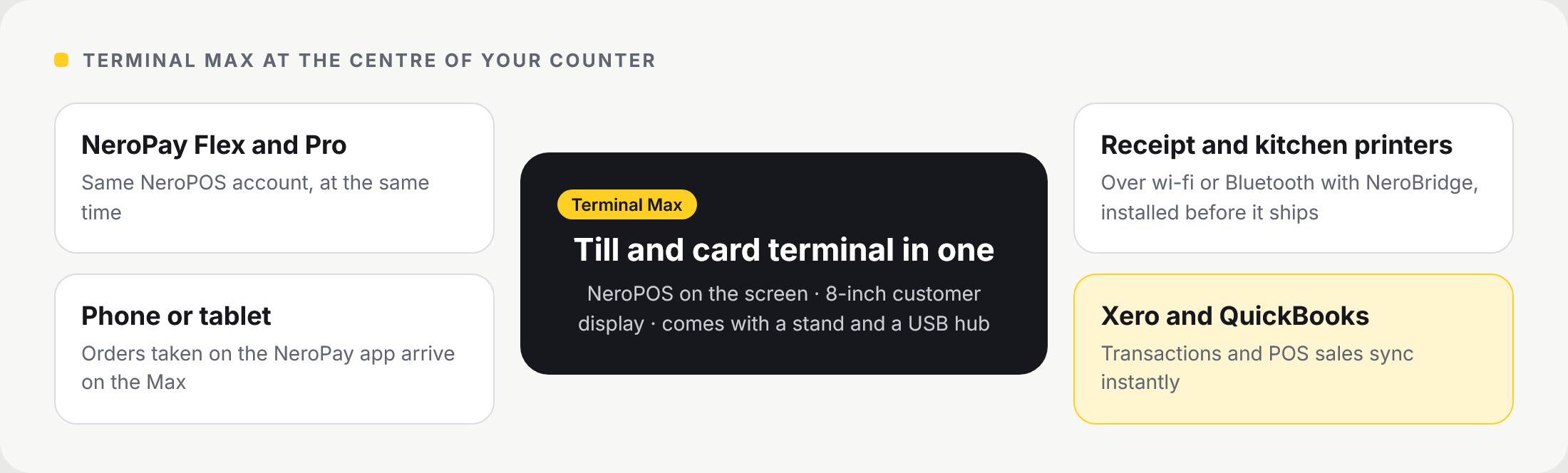
📸 How Terminal Max connects to your other devices, printers and accounting software.
What it does
| Feature | What it means for you |
|---|---|
| Till and card terminal in one | Take the order and the payment on one device, with no separate card reader |
| Customer-facing display | An 8-inch screen shows the customer their order, the total and where to pay |
| NeroPOS | Your menu, tables, staff and reports, the same as on your other NeroPay devices |
| Payments | Contactless, chip and PIN, digital wallets and swipe |
| Self-service kiosk | Customers can browse, order and pay at the counter |
| Printing | Prints to receipt and kitchen printers over wi-fi or Bluetooth |
| Orders from other devices | Orders taken on a tablet or phone with the NeroPay app arrive on the Max |
| NeroBridge | Comes installed and set up before your Max ships. It sends receipts to your printers over wi-fi and Bluetooth |
| Xero and QuickBooks | Your transactions and POS sales sync to Xero and QuickBooks instantly |
In the box
Terminal Max comes with a stand for the counter and a USB hub for extra connections.
Working with your other NeroPay devices
Terminal Max works alongside NeroPay Flex and NeroPay Pro on the same NeroPOS account, at the same time. An order taken at a table on a Flex, or on a phone with the NeroPay app, can land on the Max and go to your printers.
Specifications
| Item | Detail |
|---|---|
| Display | 8-inch IPS, 1280 × 800 |
| Size | About 205 × 139 mm, 25 mm deep (57 mm with the base) |
| Weight | About 500 g |
| Connections | Wi-fi, Ethernet (with the hub), Bluetooth for accessories |
| System | Android 15, 4 GB RAM, 64 GB storage |
| Security | End-to-end encryption, P2PE-ready, PCI 6.x |
Good to know
- Set up your menu in NeroPOS before you start. Our team can build it for you — see Setup service
- To use it as a kiosk, see Setting up a self-service kiosk
- To pair printers, see POS Settings - Printing
💡 Note: in kiosk mode the Max faces your customers. Staff enter a PIN to leave kiosk mode.
Frequently asked questions
Can Terminal Max replace my current till?
Yes. It runs NeroPOS as your till and takes card payments on the same device.
Does it work with my NeroPay Flex?
Yes. Both work on the same NeroPOS account at the same time.
Can customers order on it themselves?
Yes, as a self-service kiosk. See Setting up a self-service kiosk.
Which printers can it use?
Receipt and kitchen printers connected over wi-fi or Bluetooth.
Which payments does it take?
Contactless, chip and PIN, digital wallets and swipe.
Do I need to install any software?
No. NeroBridge is installed and set up before your Max ships.
Does it work with Xero or QuickBooks?
Yes. Your transactions and POS sales sync to both instantly.
Still need help? Contact us at support@neropay.app or create a ticket.